This time we’re going bigger than ever. Fabric, Power BI, SQL, AI and more. We're covering it all. You won't want to miss it.
Learn moreDid you hear? There's a new SQL AI Developer certification (DP-800). Start preparing now and be one of the first to get certified. Register now
I've seen a few options on how I can select between two different date columns on the same row but they all go back to "userelationship" or an "if" statement that is needed for every single measure which is slowing down my report dramatically. How do I allow a user to select a date range but by the date column they want and have it apply across all measures/data points? Thanks!
What do you not like about USERELATIONSHIP ?
My understanding of USERELATIONSHIP is that it is on the measure level/calculation only. I'm looking to allow users to look at the same dash but select which date they want to view it by. So I want to see all my measures by order date or I want to see all my measures by ship date. Not necessarily both in the same view.
Yes, create separate measures and use them in a field parameter.
Then a user has to select every field parameter each time right? i.e. Margin - Ship date, Trailing 7 days Margin - Ship date, Rev, YTD Rev, etc. instead of just clicking "ship date" and all metrics changing.
That sounds like you want to combine this with calculation groups.
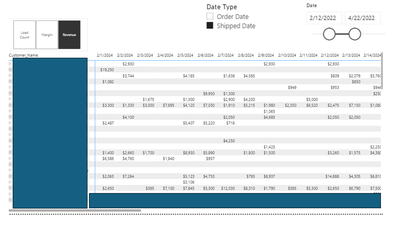
THought it might help to see what I'd like for the final output. Would calculation groups help with this? Is this in the model portion correct?
I'd like to filter by a data type, the date range and then pick a metric
Sounds reasonable. Yes, in the Model section, or in Tabular Editor. Let us know how you progress.
Check out the April 2026 Power BI update to learn about new features.
Sign up to receive a private message when registration opens and key events begin.
If you have recently started exploring Fabric, we'd love to hear how it's going. Your feedback can help with product improvements.