cancel
Showing results for 
Search instead for 
Did you mean: 

Try your skills in the Power BI Dataviz World Championship! Round one ends June 26. Join now

Reply
ÒScar
Frequent Visitor

Stacked bar chart: Avoiding bars without value

Hi, folks.


A quick and easy issue. 

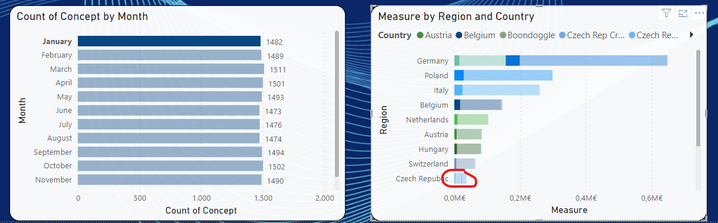
How could I hide bars without values when I make a selection in a visual object?


I mean, using the image below as an example, if I select "January" on the left I would like to see on the right only the countries with data, not all of them even the countries without data. For example, Czech Rep should be hidden in the image below


I guess I close to fix it, but I still haven´t found the proper menu.


Thank you in advance, guys.


Óscar


Scar_1-1695293060633.png


1 ACCEPTED SOLUTION
4 REPLIES 4
ÒScar
Frequent Visitor

Hi, Ibendlin. Thank for the update.

But... Where could I switch that highlighting vs filtering?

I am trying to find out more through the Visualization options but I´m still lost.


Any insight or clue for me?


Thank you again


Best

Hi again. Thank you for the trick. Impressive performance, just what I looked for.


Best

lbendlin
Super User
Super User

The "proper menu"  would be to change the default interaction from "cross highlighting"  to "cross filtering".  You want to think long and hard before changing that setting.

Helpful resources

Announcements
Fabric Data Days is here Carousel

Fabric Data Days 2026

Don't miss out on Data Days, June 15 through August 7. Learn Fabric, Power BI, SQL, AI and more.

May Power BI Update Carousel

Power BI Monthly Update - May 2026

Check out the May 2026 Power BI update to learn about new features.

Power BI DataViz World Championships carousel

Power BI DataViz World Championships - June 2026

A new Power BI DataViz World Championship is coming this June! Don't miss out on submitting your entry.

Top Solution Authors