cancel
Showing results for 
Search instead for 
Did you mean: 

The Power BI Data Visualization World Championships is back! Get ahead of the game and start preparing now! Learn more

Reply
Nagin
Frequent Visitor

Show full data in 2nd chart

Hi,

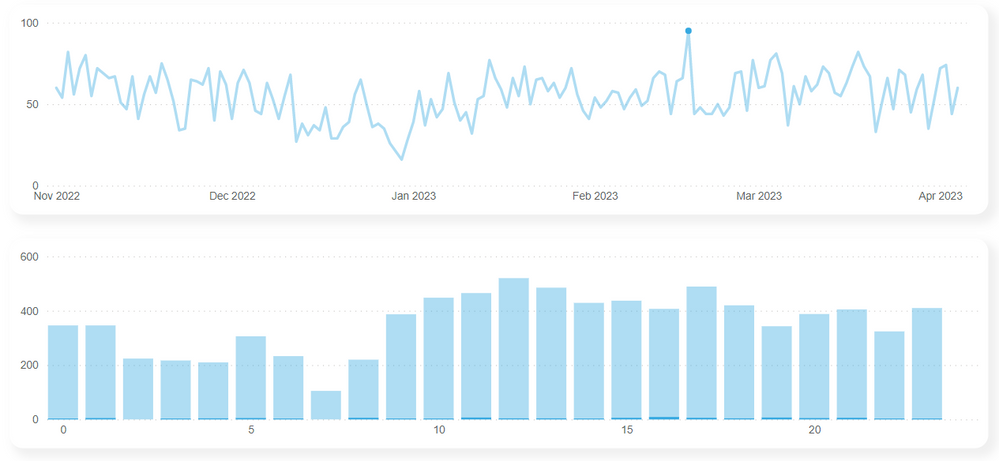
I have two charts, first chart is a line chart which shows activity by date and a second chart showing the activity by hour. Is there a way when you select a certain date in the line chart that it shows the full bar values instead of being highlighted as a subset of the main total. As it is hard to interpret the values visually as they are small compared to the full total


Thanks


Nagin


Power Bi Issue.PNG


1 ACCEPTED SOLUTION
shannnonpereira
Frequent Visitor

Hello Nagin,


You should be able to achieve this easily by following these steps:

1. Enable Edit Interactions in Format

2. Select the Line Chart Visual

3. Switch the Bar Chart interaction mode from Highlight to Filter

EditInteractions.gif

View solution in original post

1 REPLY 1
shannnonpereira
Frequent Visitor

Hello Nagin,


You should be able to achieve this easily by following these steps:

1. Enable Edit Interactions in Format

2. Select the Line Chart Visual

3. Switch the Bar Chart interaction mode from Highlight to Filter

EditInteractions.gif

Helpful resources

Announcements
Power BI DataViz World Championships

Power BI Dataviz World Championships

The Power BI Data Visualization World Championships is back! Get ahead of the game and start preparing now!

December 2025 Power BI Update Carousel

Power BI Monthly Update - December 2025

Check out the December 2025 Power BI Holiday Recap!

FabCon Atlanta 2026 carousel

FabCon Atlanta 2026

Join us at FabCon Atlanta, March 16-20, for the ultimate Fabric, Power BI, AI and SQL community-led event. Save $200 with code FABCOMM.

Top Kudoed Authors