This is best Fabric, Power BI, SQL and AI community event. How do we know? The last event sold out! Save €200 with code FABCMTY200.
Register nowA new Data Days event is coming soon! This time we’re going bigger than ever. Fabric, Power BI, SQL, AI and more. Don't miss out.
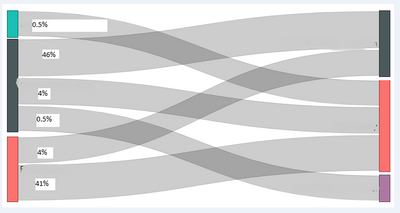
I have downloaded the sankey visual 1.10.0 from the Marketplace but it appears to me that the precentage weight isn't accurately show the difference between flows.
From the source to destination I have flows ranging from 0.5 to 4 to 46% but the flow widths are a similar size for 0.5% and 4% and the 46% flow isn't much wider than either of them. My flow precentages are (0.5%, 0.5%, 4%, 4%, 41%, 46%)
If I don't have a precentage count calculation on the weight I get more realistic thicknesses but I would like to see the % that flows from source to destination
Am I using the Sankey correctly?
Do you want to show percentage values? Am i correct?
Ignat Vilesov,
Software Engineer
Microsoft Power BI Custom Visuals
Yes and have the precentage value be represented by the weight/thickness of the connector. Not sure if the precentage should be broken down by source or destination or part there of. What I mean by that is maybe the option to decide if the precentage is based on the source, the destination or each element within the source, destination
Can you share a pbix (Power BI) report to assign it to the task for testing?
Ignat Vilesov,
Software Engineer
Microsoft Power BI Custom Visuals
Thanks. We got the email.
Ignat Vilesov,
Software Engineer
Microsoft Power BI Custom Visuals
Check out the May 2026 Power BI update to learn about new features.
Sign up to receive a private message when registration opens and key events begin.
If you have recently started exploring Fabric, we'd love to hear how it's going. Your feedback can help with product improvements.