Don't miss your chance to take the Fabric Data Engineer (DP-600) exam for FREE! Find out how by watching the DP-600 session on-demand now through April 28th.
Learn moreJoin the FabCon + SQLCon recap series. Up next: Power BI, Real-Time Intelligence, IQ and AI, and Data Factory take center stage. All sessions are available on-demand after the live show. Register now
Hi all,
Is their a way to limit the amount of data when a visuals loads by setting a Pre Filter, but when slicers are used it overides the pre - filter.
OR
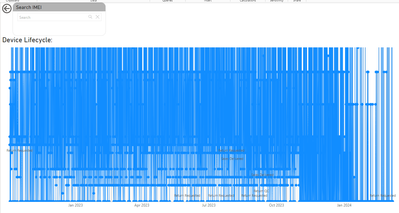
As shown below i have a Line Graph and a Custom Search Slicer. if no value is searched the graph is a complete mess. How would I go about hiding the visual if no value is searched.
I am using this Search Slicer: Business Apps – Microsoft AppSource
Hi,
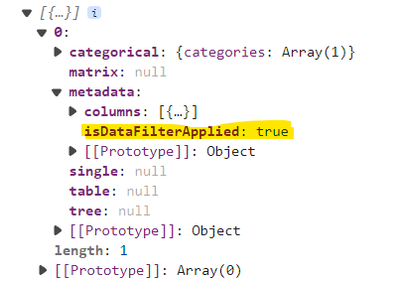
In the dataviews, when a filter is applied (from a slicer or from a general filter in filter pane), you can get the "isDataFilterApplied" attribute to true:
public update(options: VisualUpdateOptions) { console.log(options.dataViews) }
You can probably use this to only create you chart when this attribute is set to true
Hope it answers your question
Have a good day
create a measure that tests for ISFILTERED and then use that as a visual filter.
There is a small caveat, I'll let you find that yourself 🙂
Check out the April 2026 Power BI update to learn about new features.
If you have recently started exploring Fabric, we'd love to hear how it's going. Your feedback can help with product improvements.
A new Power BI DataViz World Championship is coming this June! Don't miss out on submitting your entry.