Join us in Barcelona for FabCon and SQLCon, September 28 - October 1, 2026.
This is best Fabric, Power BI, SQL and AI community event. How do we know? The last event sold out! Save €200 with code FABCMTY200.
Register now- Power BI forums
- Get Help with Power BI
- Desktop
- Service
- Report Server
- Power Query
- Mobile Apps
- Developer
- DAX Commands and Tips
- Custom Visuals Development Discussion
- Health and Life Sciences
- Power BI Spanish forums
- Translated Spanish Desktop
- Training and Consulting
- Instructor Led Training
- Dashboard in a Day for Women, by Women
- Galleries
- Data Stories Gallery
- Themes Gallery
- Contests Gallery
- QuickViz Gallery
- Quick Measures Gallery
- Visual Calculations Gallery
- Fabric Apps Gallery
- Notebook Gallery
- Translytical Task Flow Gallery
- TMDL Gallery
- R Script Showcase
- Webinars and Video Gallery
- Ideas
- Custom Visuals Ideas (read-only)
- Issues
- Issues
- Events
- Upcoming Events
July 28 - August 9 | Final Round of the Power BI Dataviz World Championships. This is your chance. Learn more
- Power BI forums
- Forums
- Get Help with Power BI
- Custom Visuals Development Discussion
- Re: Power KPI Matrix order issue
- Subscribe to RSS Feed
- Mark Topic as New
- Mark Topic as Read
- Float this Topic for Current User
- Bookmark
- Subscribe
- Printer Friendly Page


- Mark as New
- Bookmark
- Subscribe
- Mute
- Subscribe to RSS Feed
- Permalink
- Report Inappropriate Content
Power KPI Matrix order issue
Hi,
Power KPI matrix seems to have lost the ability to sort the metrics by Sort Order field. I am using v 3.1.1 of the custom visual and PBI Desktop 2.108.997.0 64-bit (August, 2022).
I have used this custom visual in the past and the sorting worked. It is not working with this version.
Thanks,
Feymar
Solved! Go to Solution.
- Mark as New
- Bookmark
- Subscribe
- Mute
- Subscribe to RSS Feed
- Permalink
- Report Inappropriate Content


- Mark as New
- Bookmark
- Subscribe
- Mute
- Subscribe to RSS Feed
- Permalink
- Report Inappropriate Content
I experienced the same issue with an older version of Power BI, as a simple update resolved it 🙂 Hope this helps!
Did I answer your question? Mark my post as a solution, this will help others!
If my response(s) assisted you in any way, don't forget to drop me a "Kudos" 🙂
Kind Regards,
Sahir Maharaj
Data Scientist | Data Engineer | Data Analyst | AI Engineer
P.S. Want me to build your Power BI solution? (Yes, its FREE!)
➤ Lets connect on LinkedIn: Join my network of 15K+ professionals
➤ Join my free newsletter: Data Driven: From 0 to 100
➤ Website: https://sahirmaharaj.com
➤ The Tech Journal Blog: https://sahirmaharaj.tech
➤ About: https://sahirmaharaj.com/about.html
➤ Email: [email protected]
➤ Want me to build your Power BI solution? Lets chat about how I can assist!
➤ Join my Medium community of 30K readers! Sharing my knowledge about data science and artificial intelligence
➤ Explore my latest project (350K+ views): Wordlit.net
➤ 100+ FREE Power BI Themes: Download Now
LinkedIn Top Voice in Artificial Intelligence, Data Science and Machine Learning
- Mark as New
- Bookmark
- Subscribe
- Mute
- Subscribe to RSS Feed
- Permalink
- Report Inappropriate Content
Additionally, try using a different dataset or changing the data structure of your current dataset and see if that resolves the issue.
Did I answer your question? Mark my post as a solution, this will help others!
If my response(s) assisted you in any way, don't forget to drop me a "Kudos" 🙂
Kind Regards,
Sahir Maharaj
Data Scientist | Data Engineer | Data Analyst | AI Engineer
P.S. Want me to build your Power BI solution? (Yes, its FREE!)
➤ Lets connect on LinkedIn: Join my network of 15K+ professionals
➤ Join my free newsletter: Data Driven: From 0 to 100
➤ Website: https://sahirmaharaj.com
➤ The Tech Journal Blog: https://sahirmaharaj.tech
➤ About: https://sahirmaharaj.com/about.html
➤ Email: [email protected]
➤ Want me to build your Power BI solution? Lets chat about how I can assist!
➤ Join my Medium community of 30K readers! Sharing my knowledge about data science and artificial intelligence
➤ Explore my latest project (350K+ views): Wordlit.net
➤ 100+ FREE Power BI Themes: Download Now
LinkedIn Top Voice in Artificial Intelligence, Data Science and Machine Learning
- Mark as New
- Bookmark
- Subscribe
- Mute
- Subscribe to RSS Feed
- Permalink
- Report Inappropriate Content
It sounds like there may be an issue with the Power KPI matrix custom visual in the version you are using. It's possible that a recent update to the custom visual or Power BI has caused this issue.
It's also possible that the problem is related to the data that you are using with the visual.
To troubleshoot the issue, try the following, check if there is a newer version of Power KPI matrix custom visual is available and update it.
Did I answer your question? Mark my post as a solution, this will help others!
If my response(s) assisted you in any way, don't forget to drop me a "Kudos" 🙂
Kind Regards,
Sahir Maharaj
Data Scientist | Data Engineer | Data Analyst | AI Engineer
P.S. Want me to build your Power BI solution? (Yes, its FREE!)
➤ Lets connect on LinkedIn: Join my network of 15K+ professionals
➤ Join my free newsletter: Data Driven: From 0 to 100
➤ Website: https://sahirmaharaj.com
➤ The Tech Journal Blog: https://sahirmaharaj.tech
➤ About: https://sahirmaharaj.com/about.html
➤ Email: [email protected]
➤ Want me to build your Power BI solution? Lets chat about how I can assist!
➤ Join my Medium community of 30K readers! Sharing my knowledge about data science and artificial intelligence
➤ Explore my latest project (350K+ views): Wordlit.net
➤ 100+ FREE Power BI Themes: Download Now
LinkedIn Top Voice in Artificial Intelligence, Data Science and Machine Learning

- Mark as New
- Bookmark
- Subscribe
- Mute
- Subscribe to RSS Feed
- Permalink
- Report Inappropriate Content
Hi,
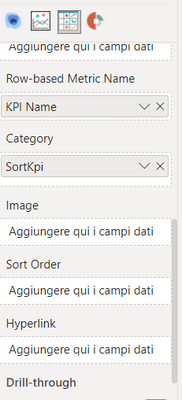
I was trying to custom sort using the visual by a dimension and I did it using the "Category" field in visual data panel.
I hope it works for you too.
Luca
- Mark as New
- Bookmark
- Subscribe
- Mute
- Subscribe to RSS Feed
- Permalink
- Report Inappropriate Content

Helpful resources

FabCon & SQLCon – Barcelona 2026
Join us in Barcelona for FabCon and SQLCon, the Fabric, Power BI, SQL, and AI community event. Save €200 with code FABCMTY200.

Fabric Community Sticker Challenge - Barcelona 2026
If you love stickers, then you will definitely want to check out our community sticker challenge, Barcelona edition!

Power BI Monthly Update - July 2026
Check out the July 2026 Power BI update to learn about new features.

Power BI DataViz World Championships - June 2026
A new Power BI DataViz World Championship is coming this June! Don't miss out on submitting your entry.


