cancel
Showing results for 
Search instead for 
Did you mean: 

The Power BI Data Visualization World Championships is back! Get ahead of the game and start preparing now! Learn more

Reply
AaronRogers3
Helper I
Helper I

Pareto Chart.. almost there just missing something

Hi All,


I am very close to achieving a successful pareto chart however i am missing something and it is causing a problem for me.


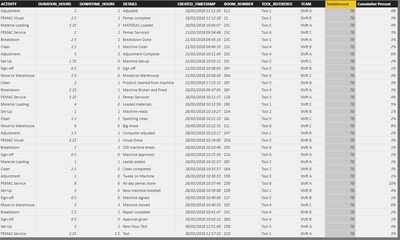
Here is my data:


CapturePBI.PNG   


What I am trying to achieve is a pareto chart to show the duration hours vs the room number.

The DAX for TotalAmount =  SUM(ENGINEER_TABLE[DURATION_HOURS])

The DAX for Cumulative Percent = [DURATION_HOURS] / [TotalAmount].


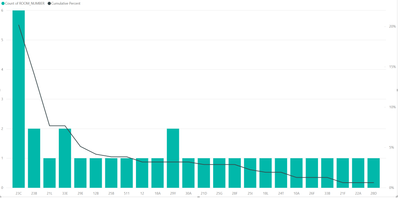
Here is the graph at the minute:


CapturePBI2.PNG


As you can see it is calculating the percentage total correctly... however why is it not to 100 percent at the right hand side?


Please help, Thanks!

1 REPLY 1
v-viig
Community Champion
Community Champion

Since it's core Power BI Column Chart we would recommend that you should create a topic in Destop thread.


Ignat Vilesov,

Software Engineer


Microsoft Power BI Custom Visuals

pbicvsupport@microsoft.com


Helpful resources

Announcements
Power BI DataViz World Championships

Power BI Dataviz World Championships

The Power BI Data Visualization World Championships is back! Get ahead of the game and start preparing now!

December 2025 Power BI Update Carousel

Power BI Monthly Update - December 2025

Check out the December 2025 Power BI Holiday Recap!

FabCon Atlanta 2026 carousel

FabCon Atlanta 2026

Join us at FabCon Atlanta, March 16-20, for the ultimate Fabric, Power BI, AI and SQL community-led event. Save $200 with code FABCOMM.