Get certified for free when you join Fabric Data Days 2026 and dive into Fabric, Power BI, SQL, AI, and other essential data skills.
Join nowData Days is here! Join us now for 60+ days of learning, challenges, and connection. Learn more
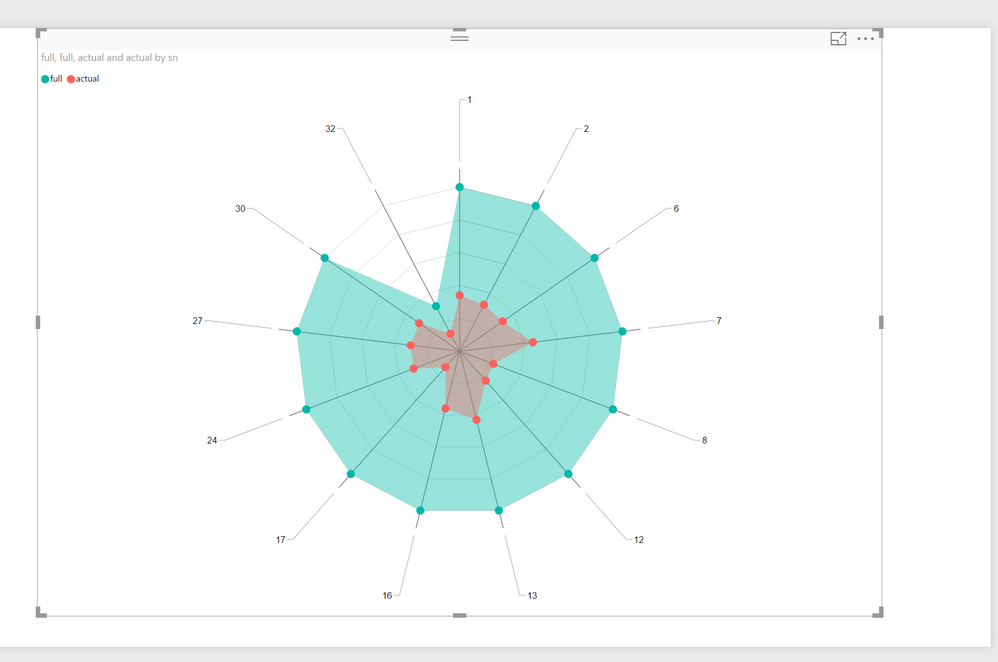
I am developing few visuals using the radar chart, and I want to display the labels as shown in the description of the radar chart on the store.
I need to show the label as in the picture below.
Sample radar chart: the desired oneBut from the edit option I can only create it in the given format.
Radar chart currently available
Can you please guide me in achieveing the desired result.
Thank you!
Hello @nairisha
Looks like the Category field contains numbers instead of strings.
Could you please clarify who you specified fields of Radar Chart?
Ignat Vilesov,
Software Engineer
Microsoft Power BI Custom Visuals
Hi @v-viig,
Thank you for the reply. The category field i've shown is just an example. In the actual case, it will be string.
I am talking about the visual from the store. https://appsource.microsoft.com/en-us/product/power-bi-visuals/WA104380771?src=office&tab=Overview
Regards,
Nairisha
Hello @nairisha
Labels' behavior (position) has been updated recently due to the possibility to intersect each other in some cases.
In other words, the screenshot at App Source is out dated.
Do you have any concerns about the current behavior?
Ignat Vilesov,
Software Engineer
Microsoft Power BI Custom Visuals
Hi @v-viig
I wanted the to know if the label display similar to the example could be achieved, as I liked it better. Thank you for clearing it out. 🙂
Regards,
Nairisha
Don't miss out on Data Days, June 15 through August 7. Learn Fabric, Power BI, SQL, AI and more.
Check out the May 2026 Power BI update to learn about new features.
| User | Count |
|---|---|
| 1 | |
| 1 | |
| 1 | |
| 1 | |
| 1 |