
cancel
Showing results for 
Search instead for 
Did you mean: 

Learn from the best! Meet the four finalists headed to the FINALS of the Power BI Dataviz World Championships! Register now

Reply
Anonymous
Not applicable

How to do conditional formatting in KPI when using Live Connection

Hey,


As we have conditional formatting in tables, can we do similar in KPI?


I have to show a color bar using a meausre, when it's >= 100% then Green, when it's <100% then Red.


I tried using table for the bar, but it doesn't show background color of the meausre until n unless i add a column to the table. 

And i can't create a blank column as i am using Live connection. 


Anything that i can try? 


thanks in advance 🙂 

1 ACCEPTED SOLUTION
Anonymous
Not applicable

I found a solution. 


You can import visual Advance card from market place. 

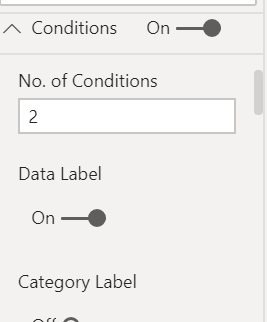
Pull you measure into it and go to Conditions into column formatting. 


Conditions.PNG


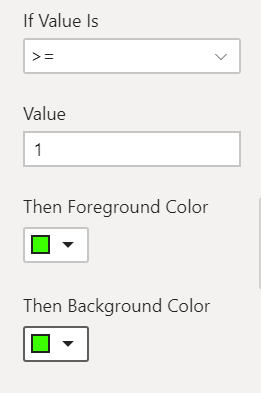
I had two conditions, to show Green color bar for when value is >=100%  and Red for the rest. 

So, i chose no of conditions = 2

and turned on Data lables

Colors.PNG


And similarly for Red.

Now turn on the fill condition and it's done.Bar.PNG


View solution in original post

1 REPLY 1
Anonymous
Not applicable

I found a solution. 


You can import visual Advance card from market place. 

Pull you measure into it and go to Conditions into column formatting. 


Conditions.PNG


I had two conditions, to show Green color bar for when value is >=100%  and Red for the rest. 

So, i chose no of conditions = 2

and turned on Data lables

Colors.PNG


And similarly for Red.

Now turn on the fill condition and it's done.Bar.PNG


Helpful resources

Announcements
Power BI DataViz World Championships carousel

Power BI DataViz World Championships - June 2026

A new Power BI DataViz World Championship is coming this June! Don't miss out on submitting your entry.

Join our Fabric User Panel

Join our Fabric User Panel

Share feedback directly with Fabric product managers, participate in targeted research studies and influence the Fabric roadmap.

March Power BI Update Carousel

Power BI Community Update - March 2026

Check out the March 2026 Power BI update to learn about new features.

Top Solution Authors
Top Kudoed Authors