cancel
Showing results for 
Search instead for 
Did you mean: 

Vote for your favorite vizzies from the Power BI Dataviz World Championship submissions. Vote now!

Reply
LuisM1
Frequent Visitor

Help with column chart categorization

Hi all


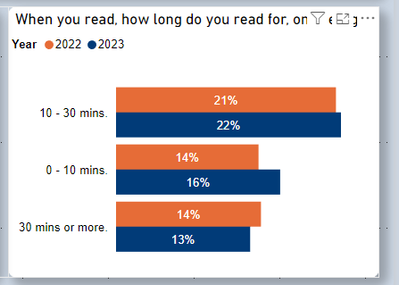
Currently i have a survey that runs annualy. At the moment i have the values as % of grand total. I wish to have a % of year total instead.


Is there a way to do this through a measure?


Here is the visual

LuisM1_1-1679519988534.png


The orange bars should add to 100% and the blue bars should add to 100%


Thank you


1 REPLY 1
Anand24
Super User
Super User

Hi @LuisM1 ,
This is completely doable in Power BI by creating calculated measures using DAX code.
Can you provide some sample data so that we can help?

PBI_SuperUser_Rank@1x.png  

Give a Thumbs Up if this post helped you in any way and Mark This Post as Solution if it solved your query !!!

Proud To Be a Super User !!!
LinkedIn

Helpful resources

Announcements
Power BI DataViz World Championships

Power BI Dataviz World Championships

Vote for your favorite vizzies from the Power BI World Championship submissions!

Sticker Challenge 2026 Carousel

Join our Community Sticker Challenge 2026

If you love stickers, then you will definitely want to check out our Community Sticker Challenge!

January Power BI Update Carousel

Power BI Monthly Update - January 2026

Check out the January 2026 Power BI update to learn about new features.

FabCon Atlanta 2026 carousel

FabCon Atlanta 2026

Join us at FabCon Atlanta, March 16-20, for the ultimate Fabric, Power BI, AI and SQL community-led event. Save $200 with code FABCOMM.

Top Solution Authors