cancel
Showing results for 
Search instead for 
Did you mean: 

Join the FabCon + SQLCon recap series. Up next: Power BI, Real-Time Intelligence, IQ and AI, and Data Factory take center stage. All sessions are available on-demand after the live show. Register now

Reply
jonkassoff
Frequent Visitor

Gantt chart bug

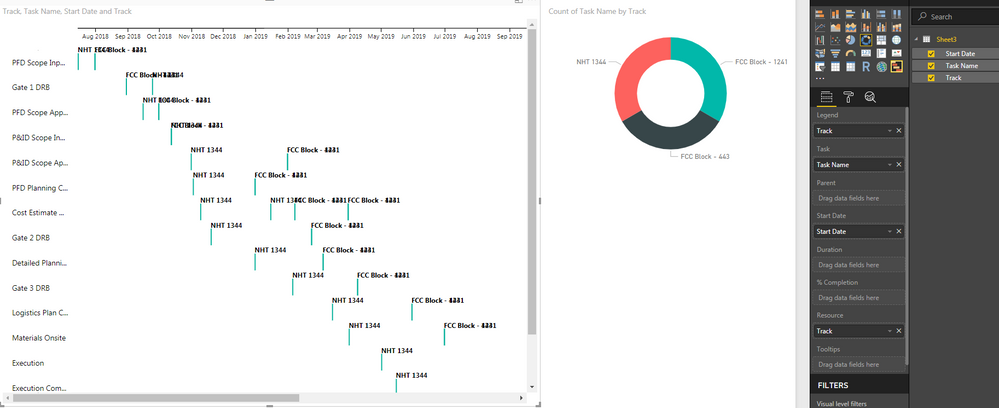
I downloaded the custom visualization and the options seem different in the one available now. I see the option to include a "Parent" which will be useful but I think if there was an update that something was broken in the process. No matter what I try it is not possible to color anything differently, it seems the Legend is not functioning. It is mentioned in the title but I cannot get it to display.


Also, when I group tasks together (which is a great feature) I do run into a problem for tasks that occur near each other in time. The titles overlap and cannot be read. Is there a way to group the tasks but not have titles overlap?

1 ACCEPTED SOLUTION

Thanks for sharing the screenshot. The issue is clear now.


Colors are not available as Duration data field is empty. Color feature work in conjuction with Duration and Task.


Ignat Vilesov,

Software Engineer


Microsoft Power BI Custom Visuals

pbicvsupport@microsoft.com


View solution in original post

3 REPLIES 3
v-viig
Community Champion
Community Champion

Colors feature works well on our side.


Could you please share a screenshot or Power BI Desktop report to reproduce both issues on our end?


Ignat Vilesov,

Software Engineer


Microsoft Power BI Custom Visuals

pbicvsupport@microsoft.com

Gantt chart.PNG


I tried to get it working by selecting "Track" as the legend. Maybe I am missing something simple?

Thanks for sharing the screenshot. The issue is clear now.


Colors are not available as Duration data field is empty. Color feature work in conjuction with Duration and Task.


Ignat Vilesov,

Software Engineer


Microsoft Power BI Custom Visuals

pbicvsupport@microsoft.com


Helpful resources

Announcements
April Power BI Update Carousel

Power BI Monthly Update - April 2026

Check out the April 2026 Power BI update to learn about new features.

New to Fabric survey Carousel

New to Fabric Survey

If you have recently started exploring Fabric, we'd love to hear how it's going. Your feedback can help with product improvements.

Power BI DataViz World Championships carousel

Power BI DataViz World Championships - June 2026

A new Power BI DataViz World Championship is coming this June! Don't miss out on submitting your entry.

FabCon and SQLCon Highlights Carousel

FabCon & SQLCon Highlights

Experience the highlights from FabCon & SQLCon, available live and on-demand starting April 14th.

Top Solution Authors