Join the Fabric User Panel to shape the future of Fabric.
Share feedback directly with Fabric product managers, participate in targeted research studies and influence the Fabric roadmap.
Sign up now- Power BI forums
- Get Help with Power BI
- Desktop
- Service
- Report Server
- Power Query
- Mobile Apps
- Developer
- DAX Commands and Tips
- Custom Visuals Development Discussion
- Health and Life Sciences
- Power BI Spanish forums
- Translated Spanish Desktop
- Training and Consulting
- Instructor Led Training
- Dashboard in a Day for Women, by Women
- Galleries
- Data Stories Gallery
- Themes Gallery
- Contests Gallery
- QuickViz Gallery
- Quick Measures Gallery
- Visual Calculations Gallery
- Notebook Gallery
- Translytical Task Flow Gallery
- TMDL Gallery
- R Script Showcase
- Webinars and Video Gallery
- Ideas
- Custom Visuals Ideas (read-only)
- Issues
- Issues
- Events
- Upcoming Events
Get Fabric certified for FREE! Don't miss your chance! Learn more
- Power BI forums
- Forums
- Get Help with Power BI
- Custom Visuals Development Discussion
- Re: Displaying columns as a grid?
- Subscribe to RSS Feed
- Mark Topic as New
- Mark Topic as Read
- Float this Topic for Current User
- Bookmark
- Subscribe
- Printer Friendly Page

- Mark as New
- Bookmark
- Subscribe
- Mute
- Subscribe to RSS Feed
- Permalink
- Report Inappropriate Content
Displaying columns as a grid?

I have data in the above format and I wish to show it like this for any particular day:
Is it possible?
Thanks!
Solved! Go to Solution.


- Mark as New
- Bookmark
- Subscribe
- Mute
- Subscribe to RSS Feed
- Permalink
- Report Inappropriate Content
There's not really a need to do that in DAX. All the necessary transforms are done in Power Query. Or am I missing something?
- Mark as New
- Bookmark
- Subscribe
- Mute
- Subscribe to RSS Feed
- Permalink
- Report Inappropriate Content
There's not really a need to do that in DAX. All the necessary transforms are done in Power Query. Or am I missing something?
- Mark as New
- Bookmark
- Subscribe
- Mute
- Subscribe to RSS Feed
- Permalink
- Report Inappropriate Content
Ok Thanks! I'll try it 🙂
- Mark as New
- Bookmark
- Subscribe
- Mute
- Subscribe to RSS Feed
- Permalink
- Report Inappropriate Content
Here is a simplistic approach using some Power Query but mostly the matrix visual. Let me know if you need it all in Power Query.
let
    Source = Table.FromRows(Json.Document(Binary.Decompress(Binary.FromText("JY3BCsIwDIbfpefB1j6CO8yDguhA2Ogh1mwNurbE7v1N9JL/40/4Ms/GtrZ1nbOmMSfKSWIghmVBoT4iVohCV3zKPLx3rQdG1MMemHMVGPMGNQtcsBTkj/GNip2KOzUfqRTdj7QiS074YJA8w4qpKt0jVfy9gPBSU65/5bSHECmR4K1QghCN918=", BinaryEncoding.Base64), Compression.Deflate)), let _t = ((type nullable text) meta [Serialized.Text = true]) in type table [Date = _t, #"Animal 1" = _t, #"Animal 2" = _t, #"Animal 3" = _t, #"Colour 1" = _t, #"Colour 2" = _t, #"Colour 3" = _t, #"Veg 1" = _t, #"Veg 2" = _t, #"Veg 3" = _t]),
    #"Unpivoted Other Columns" = Table.UnpivotOtherColumns(Source, {"Date"}, "Attribute", "Value"),
    #"Split Column by Delimiter" = Table.SplitColumn(#"Unpivoted Other Columns", "Attribute", Splitter.SplitTextByEachDelimiter({" "}, QuoteStyle.Csv, false), {"Attribute.1", "Attribute.2"})
in
    #"Split Column by Delimiter"
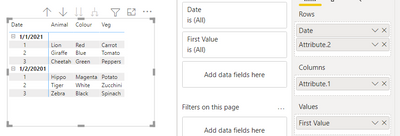
- Mark as New
- Bookmark
- Subscribe
- Mute
- Subscribe to RSS Feed
- Permalink
- Report Inappropriate Content
Great! That seems to work in the answer, but I still need to understand how to put that in Power BI (DAX?)
- Mark as New
- Bookmark
- Subscribe
- Mute
- Subscribe to RSS Feed
- Permalink
- Report Inappropriate Content
you can include text tables in your post. No need for Excel.
- Mark as New
- Bookmark
- Subscribe
- Mute
- Subscribe to RSS Feed
- Permalink
- Report Inappropriate Content
I tried many times and it gives me an "HTML detected" error. When clicking on "remove HTML and try again" it goes into a loop. Which is why I had to paste it as a picture to begin with.
- Mark as New
- Bookmark
- Subscribe
- Mute
- Subscribe to RSS Feed
- Permalink
- Report Inappropriate Content
yes, this is certainly possible in Power Query or in DAX (setting aside the question of why?!? )
Please provide sample data in usable format (not as a picture) and show the expected outcome.
- Mark as New
- Bookmark
- Subscribe
- Mute
- Subscribe to RSS Feed
- Permalink
- Report Inappropriate Content
I can't seem to upload an excel here - it isn't too difficult to re-create though.
Helpful resources

Join our Community Sticker Challenge 2026
If you love stickers, then you will definitely want to check out our Community Sticker Challenge!

Power BI Monthly Update - January 2026
Check out the January 2026 Power BI update to learn about new features.

FabCon Atlanta 2026
Join us at FabCon Atlanta, March 16-20, for the ultimate Fabric, Power BI, AI and SQL community-led event. Save $200 with code FABCOMM.


