Get certified for free when you join Fabric Data Days 2026 and dive into Fabric, Power BI, SQL, AI, and other essential data skills.
Join nowJuly 7 - July 17 | Round 2 of the Power BI Dataviz World Championships. Don't miss your chance! Learn more
Hi,
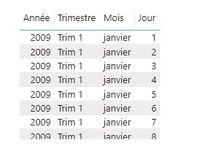
I was trying to display a date field from an array type control but i can't display it in the desire format.
for example, i would like to display it the following format : dd/mm/yyyy
here is the component used
Regards,
Salvatore
I solved my problem.
In fact it's so unclear !!
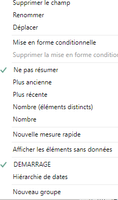
By default, the date field is set to the Date Hierarchy mode. Why ??
Sorry for the inconvenience
Hi @Salvat,
Glad you figured it out! To answer your question in your second post, Power BI Desktop has some auto date/time intelligence functionality, which will do this for dates, unless you turn it off. It's generally recommended that you do disable it in favour of using date date tables instead. MS recently added the optipon to disable globally too and not just for the current file, which is how you can turn it off for all reports going forward.
Regards,
Daniel
Proud to be a Super User!
On how to ask a technical question, if you really want an answer (courtesy of SQLBI)
Join us in Barcelona for FabCon and SQLCon, the Fabric, Power BI, SQL, and AI community event. Save €200 with code FABCMTY200.
Join Fabric Data Days 2026: 60 days of free live/on-demand sessions, challenges, study groups, and certification opportunities.
| User | Count |
|---|---|
| 3 | |
| 2 | |
| 1 | |
| 1 | |
| 1 |