This is best Fabric, Power BI, SQL and AI community event. How do we know? The last event sold out! Save €200 with code FABCMTY200.
Register nowA new Data Days event is coming soon! This time we’re going bigger than ever. Fabric, Power BI, SQL, AI and more. Don't miss out.
Hi,
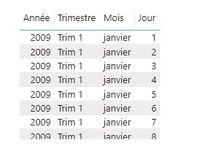
I was trying to display a date field from an array type control but i can't display it in the desire format.
for example, i would like to display it the following format : dd/mm/yyyy
here is the component used
Regards,
Salvatore
I solved my problem.
In fact it's so unclear !!
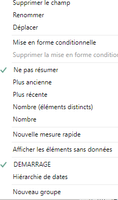
By default, the date field is set to the Date Hierarchy mode. Why ??
Sorry for the inconvenience
Hi @Salvat,
Glad you figured it out! To answer your question in your second post, Power BI Desktop has some auto date/time intelligence functionality, which will do this for dates, unless you turn it off. It's generally recommended that you do disable it in favour of using date date tables instead. MS recently added the optipon to disable globally too and not just for the current file, which is how you can turn it off for all reports going forward.
Regards,
Daniel
Proud to be a Super User!
On how to ask a technical question, if you really want an answer (courtesy of SQLBI)
Check out the May 2026 Power BI update to learn about new features.
Sign up to receive a private message when registration opens and key events begin.
If you have recently started exploring Fabric, we'd love to hear how it's going. Your feedback can help with product improvements.