cancel
Showing results for 
Search instead for 
Did you mean: 

Learn from the best! Meet the four finalists headed to the FINALS of the Power BI Dataviz World Championships! Register now

Reply
mda
Advocate I
Advocate I

Custom options for each selected columns

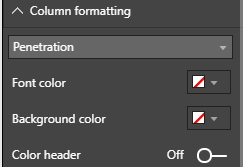
I'm creating custom table visual and I want to create options which can be set to each selected column - in the same way as it is in build in table visual.


I saw the answer from this topic custom visual enumeration issues, but the solution proposed there don't add combo with selected columns, but create a separate option for each selected column.Using this approach will take a lot of space in Format pane 

I want to add many options for a single column, so using this approach will take a lot of space in Format pane.


So anyone knows how to create combobox with selected columns names, create options for each and handle selected values?


columnFormatting.png


1 ACCEPTED SOLUTION
v-viig
Community Champion
Community Champion

Hello @mda,


As far as I know, Power BI Custom Visuals API doesn't allow us to do so.

Please create an idea here.


Ignat Vilesov,

Software Engineer


Microsoft Power BI Custom Visuals

pbicvsupport@microsoft.com

View solution in original post

2 REPLIES 2
v-viig
Community Champion
Community Champion

Hello @mda,


As far as I know, Power BI Custom Visuals API doesn't allow us to do so.

Please create an idea here.


Ignat Vilesov,

Software Engineer


Microsoft Power BI Custom Visuals

pbicvsupport@microsoft.com

OK. I post this Idea: Ability to define in capabilities object which will be populated for each selected column.


But maybe it is currently possible, but it is not documented?


Thanks,

Marcin

Helpful resources

Announcements
Join our Fabric User Panel

Join our Fabric User Panel

Share feedback directly with Fabric product managers, participate in targeted research studies and influence the Fabric roadmap.

March Power BI Update Carousel

Power BI Community Update - March 2026

Check out the March 2026 Power BI update to learn about new features.

Top Solution Authors