cancel
Showing results for 
Search instead for 
Did you mean: 

The Fabric community is now in read-only for platform upgrade. Learn more

Reply
ui_powerbi
Helper I
Helper I

Custom UI - Icon, Link and Underline

Hi Friends,


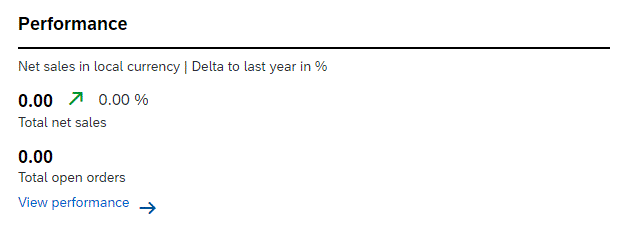
I'm very new to Power BI, I got requirement to build below UI, where I have to add a underline, one icon (Up/down) between values and a link to detail page.

Could you please guide me, how can I achieve it.


Capture2.GIF

1 REPLY 1
KerKol
Power Participant
Power Participant

Hi there, one option is to use measures in a text box.

You can use Unicode Symbols and conditionally format these per this Guy in a Cube video:

Smart Narratives and Conditional Formatting in Power BI? Yes please! - YouTube


You can add links and underlines via textbox too. You can also add links via buttons: Dynamic URL's for Images and Bookmark Buttons in Power BI - YouTube


Did I answer your question? Mark my post as a solution!

Proud to be a Super User!


Helpful resources

Announcements
FabCon and SQLCon Barcelona 2026

FabCon & SQLCon – Barcelona 2026

Join us in Barcelona for FabCon and SQLCon, the Fabric, Power BI, SQL, and AI community event. Save €200 with code FABCMTY200.

Power BI DataViz World Championships carousel

Power BI DataViz World Championships - June 2026

A new Power BI DataViz World Championship is coming this June! Don't miss out on submitting your entry.