Join us at FabCon Atlanta from March 16 - 20, 2026, for the ultimate Fabric, Power BI, AI and SQL community-led event. Save $200 with code FABCOMM.
Register now!The Power BI Data Visualization World Championships is back! Get ahead of the game and start preparing now! Learn more
Hello,
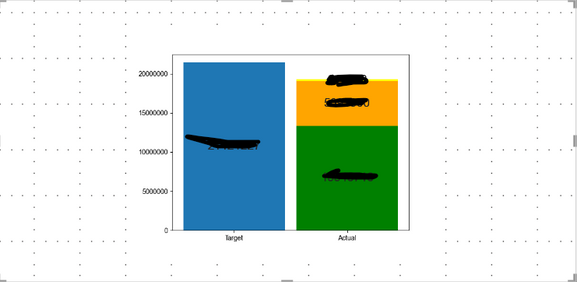
As the title says, Matplotlib Bar Chart is showing alot of empty spaces.
I want the bar chart to take up all the empty spaces shown below.
Any advice on how to get this done?
Thank you in advance!
Hi @RayWu,
Thank you for your comment.
I think my post is a little vague. What I'm trying to do is fill up the allotted space for the Python visual.
Is this an aspect ratio issue? Do you have any other advice?
Thank you in advance!
@Anonymous
To get rid of whitespace around the border, set bbox_inches='tight' in the savefig() method.
I recommend using plotly js custom visual https://appsource.microsoft.com/en-us/product/power-bi-visuals/akvelon.plotlyjsvisualbyakvelon?tab=Overview
You can select bar graph and built on top of it - it has more functionality and is easier to configure stuff.
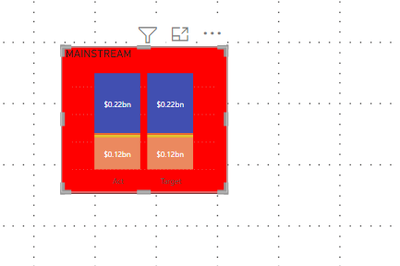
As a comparison, the table below is what I want the chart to look like.
The chart inside the square fills up all of its allotted space. No empty spaces.
The Power BI Data Visualization World Championships is back! Get ahead of the game and start preparing now!
Check out the November 2025 Power BI update to learn about new features.
| User | Count |
|---|---|
| 7 | |
| 5 | |
| 4 | |
| 2 | |
| 2 |