cancel
Showing results for 
Search instead for 
Did you mean: 

The Power BI Data Visualization World Championships is back! It's time to submit your entry. Live now!

Reply
law_90
New Member

Creating Pie Chart by grouping user

Hi all,

I am totally new to Power BI. So I have a lot more to learn, but to speed up things, I am going to ask my question here.

I currently having the below visual table:

law_90_0-1673593260925.png

How can I create a Pie Chart visual with this visual table that it will just showing the owner of NOT FOUND and also all the owner as a group?
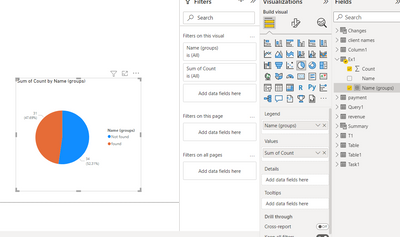
I mean my pie chart should looks like 34 NOT FOUND and 31 FOUND only.


Your guidance is very much appreciated.

Thank you!


1 ACCEPTED SOLUTION
olgad
Resident Rockstar
Resident Rockstar

Hi there,
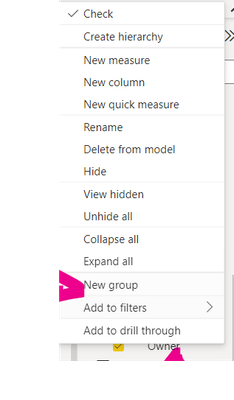
right click on your column owner and create a new group

olgad_0-1673733349965.png

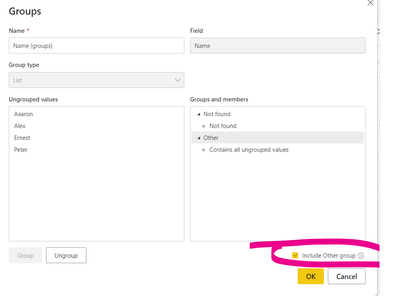
Select Not found then Group

olgad_1-1673733396179.png

Tick include other values 

olgad_2-1673733441595.png

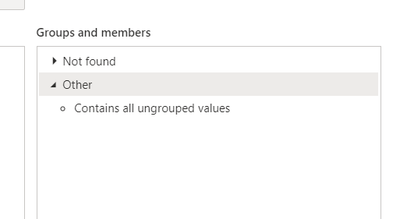
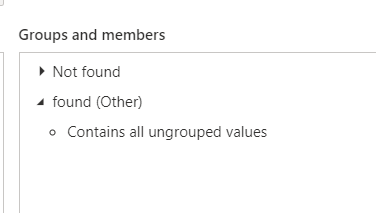
Click twice on the Other, if you need to rename it

olgad_3-1673733479517.pngolgad_4-1673733521138.pngolgad_5-1673733544178.png

There you have it


DID I ANSWER YOUR QUESTION? PLEASE MARK MY POST AS A SOLUTION! APPRECIATE YOUR KUDO/LIKE!
PROUD TO BE A SUPER USER!
Best Stories, Interesting Cases: PowerBI Storytime Newsletter
Linkedin Profile: Linkedin
YouTube Channel: PowerBI Storytime

View solution in original post

1 REPLY 1
olgad
Resident Rockstar
Resident Rockstar

Hi there,
right click on your column owner and create a new group

olgad_0-1673733349965.png

Select Not found then Group

olgad_1-1673733396179.png

Tick include other values 

olgad_2-1673733441595.png

Click twice on the Other, if you need to rename it

olgad_3-1673733479517.pngolgad_4-1673733521138.pngolgad_5-1673733544178.png

There you have it


DID I ANSWER YOUR QUESTION? PLEASE MARK MY POST AS A SOLUTION! APPRECIATE YOUR KUDO/LIKE!
PROUD TO BE A SUPER USER!
Best Stories, Interesting Cases: PowerBI Storytime Newsletter
Linkedin Profile: Linkedin
YouTube Channel: PowerBI Storytime

Helpful resources

Announcements
FabCon Atlanta 2026 carousel

FabCon Atlanta 2026

Join us at FabCon Atlanta, March 16-20, for the ultimate Fabric, Power BI, AI and SQL community-led event. Save $200 with code FABCOMM.

Top Solution Authors