Get certified for free when you join Fabric Data Days 2026 and dive into Fabric, Power BI, SQL, AI, and other essential data skills.
Join nowTry your skills in the Power BI Dataviz World Championship! Round one ends June 26. Join now
Hello,
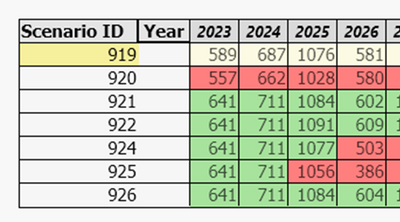
I was wondering it was possible to create something like the below table in PowerBI (it was created in Qlikview). The table compares results for different scenarios. the expression is just 'sum of [Quantity]'.
For clarity the fields used in the table are:
Scenario ID (dimension)
Year (dimension)
Quantity (fact)
when a single scenario is filtered the cells for the scenario have a yellow background. red and green color formatting is then used for the table cells for the other scenarios; green if the number in the cell is higher than the selected scenario and red if it is a lower value. This is calculated at year level rather than at a total level as can be seen in the image.
any help?
much appreciated
PHins
generally you have one measure that provides the cell values and another measure that provides the conditional formatting instructions. You can use FILTERS() to figure out which row in your visual has the focus.
| User | Count |
|---|---|
| 3 | |
| 1 | |
| 1 | |
| 1 | |
| 1 |