cancel
Showing results for 
Search instead for 
Did you mean: 

The Power BI Data Visualization World Championships is back! Get ahead of the game and start preparing now! Learn more

Reply
LayerWulf
New Member

Comparing two dates on the Y axis

Hello Community,


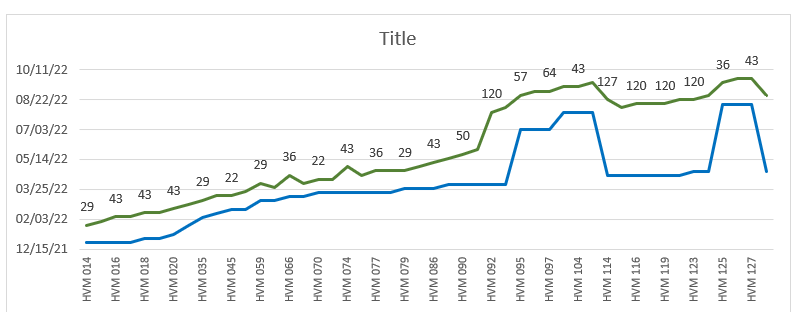
I'm trying to duplicate a chart I created in Excel into PBI. I need to compare the difference in shipping dates vs. installation dates for certain equipment. Therefore, the X axis will be the equipment ID's and the Y will compare the two dates for each tool. In Excel I have 3 columns: Tool ID, Ship Date, Install Date and it's graphed out as such. The data labels are just the difference in days between the two days. I have not been able to replicate this in PBI. Any assistance/guidance would be greatly appreciated. 


PBI Chart.png

1 ACCEPTED SOLUTION

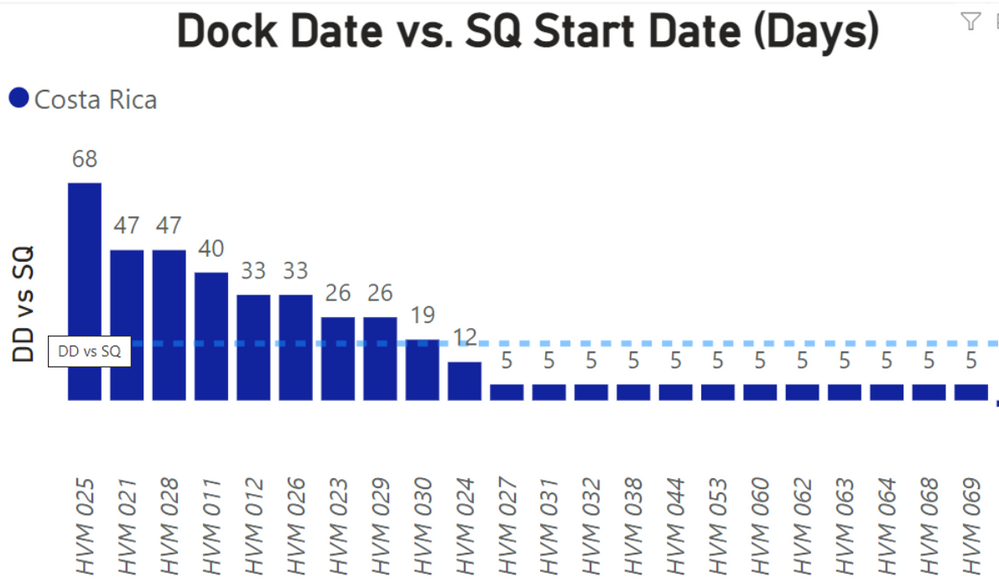
Thank you. I took your advice but created a new column using DateDiff to acquire the whole number. 

PBI Chart 2.png

View solution in original post

2 REPLIES 2
lbendlin
Super User
Super User

You are using a visual type that is unsuitable for the story you are telling. A line chart implies a dependency between the items on the x axis, like a temporal succession. Your products are independent of each other and should not be connected via a line.  Use a column chart instead.


You can convert dates to Whole Number format and use that for the column values.

Thank you. I took your advice but created a new column using DateDiff to acquire the whole number. 

PBI Chart 2.png

Helpful resources

Announcements
Power BI DataViz World Championships

Power BI Dataviz World Championships

The Power BI Data Visualization World Championships is back! Get ahead of the game and start preparing now!

December 2025 Power BI Update Carousel

Power BI Monthly Update - December 2025

Check out the December 2025 Power BI Holiday Recap!

FabCon Atlanta 2026 carousel

FabCon Atlanta 2026

Join us at FabCon Atlanta, March 16-20, for the ultimate Fabric, Power BI, AI and SQL community-led event. Save $200 with code FABCOMM.

Top Solution Authors