cancel
Showing results for 
Search instead for 
Did you mean: 

Data Days is here! Join us now for 60+ days of learning, challenges, and connection. Learn more

Reply
Anonymous
Not applicable

By Weekely Graph

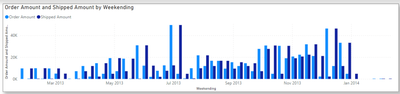
 need to create a bar graph using the shipped amount and ordered amount, which should be like below.

curious_111_2-1711001266034.png


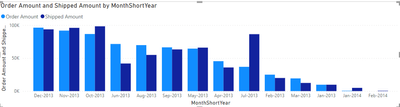
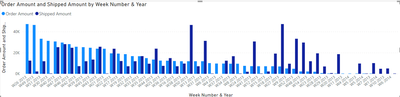
But when I am trying to achieve this I got graphs like below

curious_111_1-1711001247777.png


curious_111_3-1711001280666.png

I am not sure exactly how can I solve this. My date_table code is


Date_Table =
VAR _Table=
ADDCOLUMNS(
    CALENDAR(DATE(2013,1,24),DATE(2014,2,31)),
    "Consecutive Week Number",WEEKNUM([Date],2)
    + 52
        * ( YEAR ( [Date] ) - YEAR (DATE(2013,1,24) ) ),
    "Week Number & Year","W" & WEEKNUM([Date]) & " " & YEAR([Date]),
    "WeekYearNumber",YEAR([Date]) & 100 + WEEKNUM([Date]),
    "MonthShortYear",FORMAT([Date],"mmm-YYYY")
)
RETURN
_Table


0 REPLIES 0

Helpful resources

Announcements
Fabric Data Days is here Carousel

Fabric Data Days 2026

Don't miss out on Data Days, June 15 through August 7. Learn Fabric, Power BI, SQL, AI and more.

May Power BI Update Carousel

Power BI Monthly Update - May 2026

Check out the May 2026 Power BI update to learn about new features.

Power BI DataViz World Championships carousel

Power BI DataViz World Championships - June 2026

A new Power BI DataViz World Championship is coming this June! Don't miss out on submitting your entry.

Top Solution Authors