cancel
Showing results for 
Search instead for 
Did you mean: 

The Power BI Data Visualization World Championships is back! Get ahead of the game and start preparing now! Learn more

Reply
Anonymous
Not applicable

4 box model visual

is there any 4 box model visual available in power BI.


I have data of Exam result and faculty feedback. i want to create four box model like visual so that i can calculate

1: which faculty's result is average but feedback is good

2: Which faculty's result is good and feedback is good

3: which faculty's result is average and feedback is average

4: which faculty's result is good and feedback is average


 i want to show the name of faculties in the boxes accordingly.

1 ACCEPTED SOLUTION
Nathaniel_C
Community Champion
Community Champion

Hi @Anonymous ,

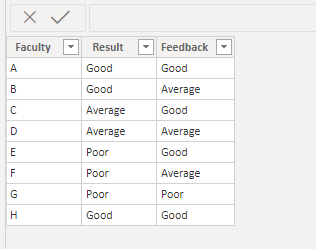
You can make your own, by combining four cards with a different measure for each.  See my picture below. Click on it to enlarge. Included in it, is the measure for box 1. Just write 3 more measures, one for each box, and change the "Good" or "Average for each one. Please note in my table, I entered some "Poor" as well. I will include a picture of my table, too.

If this solves your issue, please mark this as the solution! Kudos are nice too.

@Nathaniel_C 


Faculty Box 1 = CALCULATE(CONCATENATEX(Table1,Table1[Faculty], ", "),Table1[Result]="Average",Table1[Feedback]="Good")


Faculty box.PNG


Table1 Faculty.PNG


Did I answer your question? Mark my post as a solution!

Proud to be a Super User!


View solution in original post

1 REPLY 1
Nathaniel_C
Community Champion
Community Champion

Hi @Anonymous ,

You can make your own, by combining four cards with a different measure for each.  See my picture below. Click on it to enlarge. Included in it, is the measure for box 1. Just write 3 more measures, one for each box, and change the "Good" or "Average for each one. Please note in my table, I entered some "Poor" as well. I will include a picture of my table, too.

If this solves your issue, please mark this as the solution! Kudos are nice too.

@Nathaniel_C 


Faculty Box 1 = CALCULATE(CONCATENATEX(Table1,Table1[Faculty], ", "),Table1[Result]="Average",Table1[Feedback]="Good")


Faculty box.PNG


Table1 Faculty.PNG


Did I answer your question? Mark my post as a solution!

Proud to be a Super User!


Helpful resources

Announcements
Power BI DataViz World Championships

Power BI Dataviz World Championships

The Power BI Data Visualization World Championships is back! Get ahead of the game and start preparing now!

December 2025 Power BI Update Carousel

Power BI Monthly Update - December 2025

Check out the December 2025 Power BI Holiday Recap!

FabCon Atlanta 2026 carousel

FabCon Atlanta 2026

Join us at FabCon Atlanta, March 16-20, for the ultimate Fabric, Power BI, AI and SQL community-led event. Save $200 with code FABCOMM.