Join us at FabCon Atlanta from March 16 - 20, 2026, for the ultimate Fabric, Power BI, AI and SQL community-led event. Save $200 with code FABCOMM.
Register now!The Power BI Data Visualization World Championships is back! It's time to submit your entry. Live now!
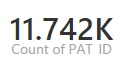
Count function gives round figure on PowerBI Desktop but when same report is published to the service it gives decimal number which in some cases doesn't make sense.
For example, decimal number in count of people is not meaningful.
Seen in PowerBI service
Out of curiousity, what is setting the "whole number" aspect of your value? Do you have it set to "whole number" in the data model? Data model, Modeling, select the column and make sure that Data Type and Format are "Whole Number". You can impact how the card is displayed in the Service. Click the visual in the Service editing the Report and click the paintbrush icon. Under Data label, change the Display and Decimal options.
Decimal in a number displayed in thousands is meaningful. Like @Greg_Deckler said, you can change the units of display for a card to avoid using units.
The Power BI Data Visualization World Championships is back! It's time to submit your entry.
| User | Count |
|---|---|
| 45 | |
| 44 | |
| 40 | |
| 15 | |
| 15 |