cancel
Showing results for 
Search instead for 
Did you mean: 

The Power BI Data Visualization World Championships is back! Get ahead of the game and start preparing now! Learn more

Reply
CrisSmeu
New Member

Write text on graph

Hi!

Does anyone know if beside the title of the graph and the legend, I could maybe write additional text inside the graph?

Maybe something like I have attached in the picture with Yearly Target etc. This is something that should be extra from the legend.

Thanks!bigraph.PNG

2 ACCEPTED SOLUTIONS
vanessa
Post Patron
Post Patron

@CrisSmeu


I don't think that is possible.


But maybe as a workaround, you can use text boxes and grids (with transparent borders, no headers)/card visual and bring the graph to the front.

View solution in original post

Anonymous
Not applicable

Hi @CrisSmeu

You are able to edit title text of the graph and legend, adjust legend name position using the settings under Format.
2.PNG

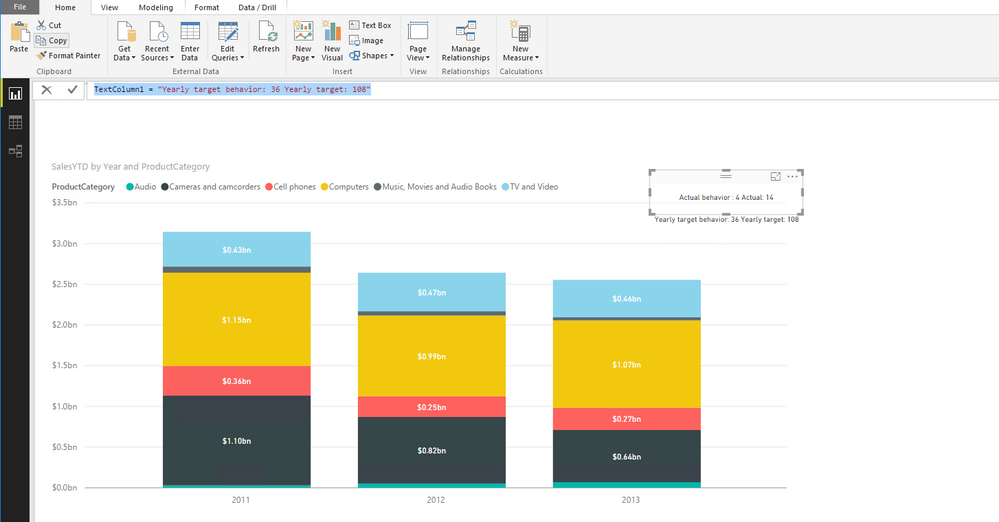
However, if you want to write additional text inside the graph in the format as shown in your screenshot, as other post, add a Text Box  or create card visuals.

You can create new columns by using formula below, then create card visuals using new columns and drag these card visuals into your graph.

TextColumn = "Actual behavior : 4 Actual: 14"
TextColumn1 = "Yearly target behavior: 36 Yearly target: 108"
1.PNG


Thanks,
Lydia Zhang


View solution in original post

5 REPLIES 5
Threeseba
New Member

I understand that the thread is six years old, but the concept of adding text inside a graph remains relevant and is a fundamental aspect of data visualization. If you have any more recent questions or need assistance with other topics, please feel free to ask. Additionally, if you're interested in exploring strategies to potentially make $10,000 a month or more through various income streams, you can refer to this informative guide on How to Make 10k a Month. It provides valuable insights that are timeless and can help you work toward your financial goals.

daffjeri
New Member

Hello, are you looking to earn extra cash? Earn money by paid surveys and etc. I recommend Clixsense. Free to sign up by clicking below link.

http://www.clixsense.com/?8172285

daffjeri
New Member

Hello, are you looking to earn extra cash? Earn money by paid surveys and etc. I recommend Clixsense. Free to sign up by clicking below link.

http://www.clixsense.com/?8172285

Anonymous
Not applicable

Hi @CrisSmeu

You are able to edit title text of the graph and legend, adjust legend name position using the settings under Format.
2.PNG

However, if you want to write additional text inside the graph in the format as shown in your screenshot, as other post, add a Text Box  or create card visuals.

You can create new columns by using formula below, then create card visuals using new columns and drag these card visuals into your graph.

TextColumn = "Actual behavior : 4 Actual: 14"
TextColumn1 = "Yearly target behavior: 36 Yearly target: 108"
1.PNG


Thanks,
Lydia Zhang


vanessa
Post Patron
Post Patron

@CrisSmeu


I don't think that is possible.


But maybe as a workaround, you can use text boxes and grids (with transparent borders, no headers)/card visual and bring the graph to the front.

Helpful resources

Announcements
Power BI DataViz World Championships

Power BI Dataviz World Championships

The Power BI Data Visualization World Championships is back! Get ahead of the game and start preparing now!

December 2025 Power BI Update Carousel

Power BI Monthly Update - December 2025

Check out the December 2025 Power BI Holiday Recap!

FabCon Atlanta 2026 carousel

FabCon Atlanta 2026

Join us at FabCon Atlanta, March 16-20, for the ultimate Fabric, Power BI, AI and SQL community-led event. Save $200 with code FABCOMM.