Get Fabric or SQL Certified for Free.
Get certified for free when you join Fabric Data Days 2026 and dive into Fabric, Power BI, SQL, AI, and other essential data skills.
Join now- Power BI forums
- Get Help with Power BI
- Desktop
- Service
- Report Server
- Power Query
- Mobile Apps
- Developer
- DAX Commands and Tips
- Custom Visuals Development Discussion
- Health and Life Sciences
- Power BI Spanish forums
- Translated Spanish Desktop
- Training and Consulting
- Instructor Led Training
- Dashboard in a Day for Women, by Women
- Galleries
- Data Stories Gallery
- Themes Gallery
- Contests Gallery
- QuickViz Gallery
- Quick Measures Gallery
- Visual Calculations Gallery
- Notebook Gallery
- Translytical Task Flow Gallery
- TMDL Gallery
- R Script Showcase
- Webinars and Video Gallery
- Ideas
- Custom Visuals Ideas (read-only)
- Issues
- Issues
- Events
- Upcoming Events
Try your skills in the Power BI Dataviz World Championship! Round one ends June 26. Join now
- Power BI forums
- Forums
- Get Help with Power BI
- Service
- Workspace Management Best Practices
- Subscribe to RSS Feed
- Mark Topic as New
- Mark Topic as Read
- Float this Topic for Current User
- Bookmark
- Subscribe
- Printer Friendly Page


- Mark as New
- Bookmark
- Subscribe
- Mute
- Subscribe to RSS Feed
- Permalink
- Report Inappropriate Content
Workspace Management Best Practices
Hello,
I'd like to know some best practices for managing my team's Power BI workspace. Until recently, everyone on my team could publish a PBI report to the workspace. This created a lot of waste as irrelevant reports were published. I've gone through the process of coordinating with team members to remove clutter reports from the workspace, so it's clean now.
To prevent something similar from happening again, I'd like to establish a process for my team that covers report publishing to the team workspace so that all content is relevant, and that each content is tied to atleast one audience. This process needs to be non-cumbersome and should avoid a single individual that gatekeeps/approves which reports belong to the workspace. Any ideas?
Solved! Go to Solution.


- Mark as New
- Bookmark
- Subscribe
- Mute
- Subscribe to RSS Feed
- Permalink
- Report Inappropriate Content
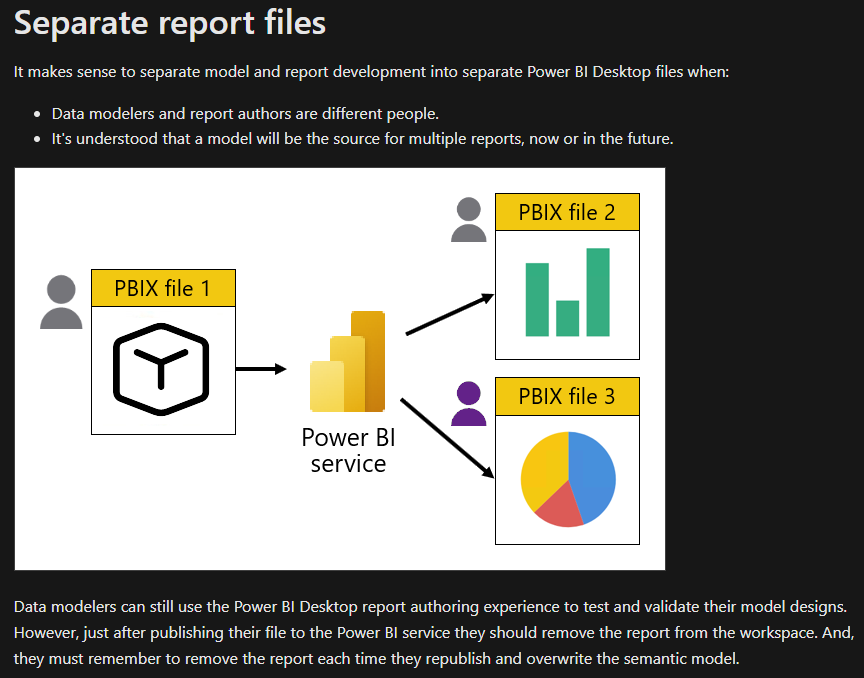
Many documentations and videos you can find on the internet to answer your first question
Regards
Amine Jerbi
If I answered your question, please mark this thread as accepted
and you can follow me on
My Website, LinkedIn and Facebook


- Mark as New
- Bookmark
- Subscribe
- Mute
- Subscribe to RSS Feed
- Permalink
- Report Inappropriate Content
I like the way aj1973 explained,
I am in the same scenario and honestly I even thinking where to start because I don't have access to many workspace and the organization allowed everyone to create his/her own workspace and there are a lot of Power BI dev with estimation of more than 100 reports.
Now, I want to start some best practices just for my country so later I can cascade slowly to others because I was using Power BI report server in previous and I managed to hand this now I am new in workspaces.
My question from your solution, if we have one dataset and each of us want to create a report by downloading it so to know the dataset source column will it be possible or it will only need to update the report online.
I didn't create a new thread to avoid loosing focus on the best practice you already initiated here.
- Mark as New
- Bookmark
- Subscribe
- Mute
- Subscribe to RSS Feed
- Permalink
- Report Inappropriate Content
Hi @tmhalila
Not sure to understand your question!
Frist of all, letting everyone in the organization create his/her own workspace not a good practice.
Secondaly, letting everyone in the organization to download the Dataset it is not a good practice.
Thirdly the thin reports should update automatically right after the dataset has been refreshed.
Best Practice is always to leave the dataset in its WS and give Build permission to it but not to the workspace to the concerned users, these users will have to use Power BI Desktop and use the Semantic Model connector to develop thin reports on top of this Dataset.
Regards
Amine Jerbi
If I answered your question, please mark this thread as accepted
and you can follow me on
My Website, LinkedIn and Facebook
- Mark as New
- Bookmark
- Subscribe
- Mute
- Subscribe to RSS Feed
- Permalink
- Report Inappropriate Content
You have answered my question and the links you have shared they are very helpful and a good point of starting. Thank you!
- Mark as New
- Bookmark
- Subscribe
- Mute
- Subscribe to RSS Feed
- Permalink
- Report Inappropriate Content
Hi @datapal04
Best practice is to seperate Reports(Thin Reports) from its Semantic models :
- Create 3 Workspaces: WS_DEV&Test , WS_Dataset_Prod(Could containt only Datssets or both) , WS_Report_Prod (Thin reports
- Use AD security groups to add to WS and share reports in App,
- Members and collaborators can only publish in WS_DEV&Test
- Create App from WS_Report_Prod
- Add reports into different Audiences in App environment
- Add security groups to specific audiences
Regards
Amine Jerbi
If I answered your question, please mark this thread as accepted
and you can follow me on
My Website, LinkedIn and Facebook
- Mark as New
- Bookmark
- Subscribe
- Mute
- Subscribe to RSS Feed
- Permalink
- Report Inappropriate Content
Hi @aj1973 , thanks for your reply! What's the reasoning for seperating reports from their semantic models?
I was also thinking that naming conventions can help with determining which reports and semantic models are production-ready (ex. "PROD_Test Report"). What does everyone think of this approach?
- Mark as New
- Bookmark
- Subscribe
- Mute
- Subscribe to RSS Feed
- Permalink
- Report Inappropriate Content
Many documentations and videos you can find on the internet to answer your first question
Regards
Amine Jerbi
If I answered your question, please mark this thread as accepted
and you can follow me on
My Website, LinkedIn and Facebook
- Mark as New
- Bookmark
- Subscribe
- Mute
- Subscribe to RSS Feed
- Permalink
- Report Inappropriate Content
Hi,
Indeed, naming convention is defenitly a good help. Here is documentations and video for help.
To answer your first question :
Separating reports from their semantic models is a best practice in Power BI workspace management. This is because it allows for better control over the data and the reports that are built on top of it. By separating the two, you can ensure that the data is accurate and up-to-date, while also allowing for more flexibility in the creation of reports. Additionally, it makes it easier to manage the different components of your workspace, as you can focus on each one separately. Deleting or removing an Item from a WS by mistake can be very inconvinient because there is no way to restore it, Having the same item in 2 different WS with limit access helps recover it...
Here is some other disadvatanges of not separating items :
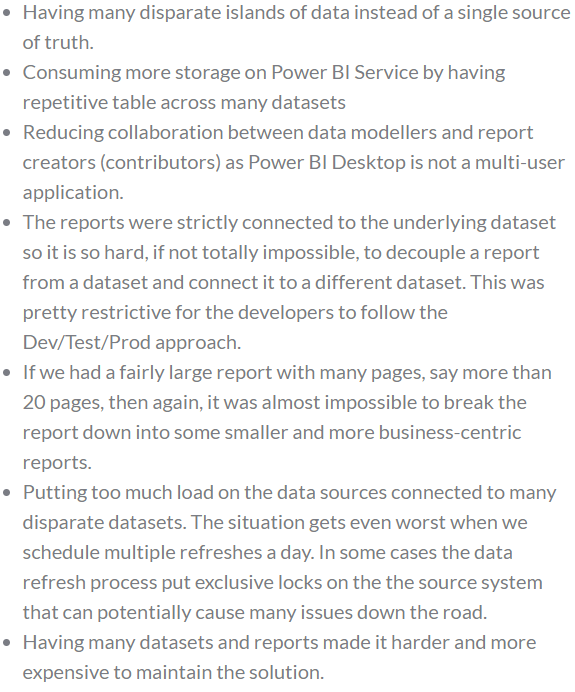
https://biinsight.com/thin-reports-what-are-they-and-why-should-i-care-and-how-can-i-create-them/
Regards
Amine Jerbi
If I answered your question, please mark this thread as accepted
and you can follow me on
My Website, LinkedIn and Facebook

Helpful resources

Data Days 2026
Don't miss out on Data Days, June 15 through August 7. Learn Fabric, Power BI, SQL, AI and more.

Power BI DataViz World Championships - June 2026
A new Power BI DataViz World Championship is coming this June! Don't miss out on submitting your entry.

| User | Count |
|---|---|
| 16 | |
| 15 | |
| 13 | |
| 9 | |
| 8 |


| User | Count |
|---|---|
| 39 | |
| 38 | |
| 34 | |
| 28 | |
| 23 |


