cancel
Showing results for 
Search instead for 
Did you mean: 

The Power BI Data Visualization World Championships is back! Get ahead of the game and start preparing now! Learn more

Reply
Anonymous
Not applicable

Unable to remove dashboard

We have a dashboard in our workspace that we are not really sure how got there - and frustratingly we seem unable to remove it.


There are no visible reports or datasets for the dashboard ("View Related" shows "No related content"). 


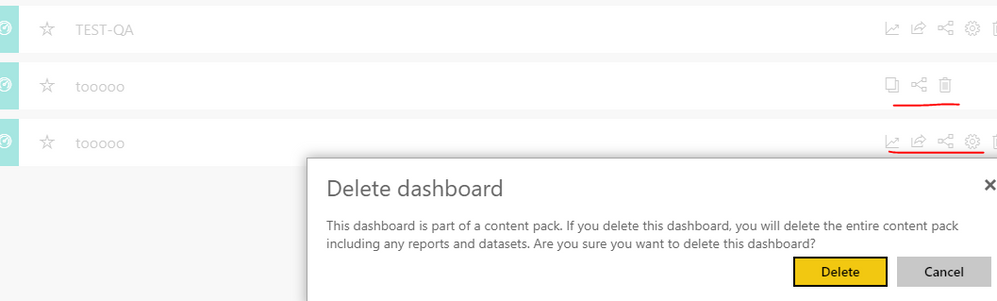
Selecting "Delete" on the below apparently does nothing - no errors or warnings, but the dashboard stays put.


Capture.PNG


The owner of the dashboard is a different group within our organization, would they need to remove it for us?

2 REPLIES 2
v-frfei-msft
Community Support
Community Support

Hi @Anonymous,


The dashboard should be the one that you got from the content pack. You can delete it directly without removing the related content pack.


Capture.PNG


Regards,

Frank

Community Support Team _ Frank
If this post helps, then please consider Accept it as the solution to help the others find it more quickly.
Anonymous
Not applicable

That is what I'm attempting - but the dashboard remains after I press "Delete"

Helpful resources

Announcements
Power BI DataViz World Championships

Power BI Dataviz World Championships

The Power BI Data Visualization World Championships is back! Get ahead of the game and start preparing now!

December 2025 Power BI Update Carousel

Power BI Monthly Update - December 2025

Check out the December 2025 Power BI Holiday Recap!

FabCon Atlanta 2026 carousel

FabCon Atlanta 2026

Join us at FabCon Atlanta, March 16-20, for the ultimate Fabric, Power BI, AI and SQL community-led event. Save $200 with code FABCOMM.