This time we’re going bigger than ever. Fabric, Power BI, SQL, AI and more. We're covering it all. You won't want to miss it.
Learn moreGet Fabric Certified for FREE during AI Skills Fest. This week only. Secure your voucher now.
Hi all,
In Power Bi i do not find how to use function on an email column
ex: To make difference of Internal and external people of my company, the "-ext" is added to the email
| Internal | |
| toto@mycompany.com | true |
| toto-ext@mycompany.com | false |
| test@mycompany.com | true |
I used the CONTAINS function but does not work with "Email" column.. any idea??
External User = CONTAINS(Users,Users[email], "-ext")
Thanks you for your help.
Solved! Go to Solution.
Check out this post: https://community.powerbi.com/t5/Desktop/If-text-column-CONTAINS-specified-value-give-me-what-I-want...
Rather than using CONTAINS, you can use SEARCH and return True/False in the conditional IF statement.
Hi @propionic,
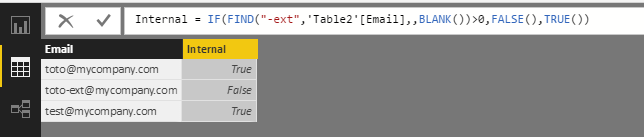
You can also use Find() function to create a calculated column below:
Internal = IF(FIND("-ext",'Table2'[Email],,BLANK())>0,FALSE(),TRUE())
Best Regards,
Qiuyun Yu
Hi @propionic,
You can also use Find() function to create a calculated column below:
Internal = IF(FIND("-ext",'Table2'[Email],,BLANK())>0,FALSE(),TRUE())
Best Regards,
Qiuyun Yu
Check out this post: https://community.powerbi.com/t5/Desktop/If-text-column-CONTAINS-specified-value-give-me-what-I-want...
Rather than using CONTAINS, you can use SEARCH and return True/False in the conditional IF statement.
Check out the May 2026 Power BI update to learn about new features.
Sign up to receive a private message when registration opens and key events begin.
If you have recently started exploring Fabric, we'd love to hear how it's going. Your feedback can help with product improvements.
| User | Count |
|---|---|
| 15 | |
| 11 | |
| 9 | |
| 7 | |
| 7 |
| User | Count |
|---|---|
| 43 | |
| 35 | |
| 31 | |
| 23 | |
| 20 |