Forum Discussion

Scheduled refresh fail
 8 years ago
Our scheduled refresh seemed to fix itself on 1/12. Successful daily schedule refreshes completed 1/12, 1/13, 1/4, 1/15, and 1/16. Any ideas on the root cause?

HI timclaeys,
You provide a common error message, can you share more detail info to help us clarify this issue?
For e.g. gateway local logs, operation trace log...
Troubleshooting the on-premises data gateway
Collecting logs from the gateway configurator
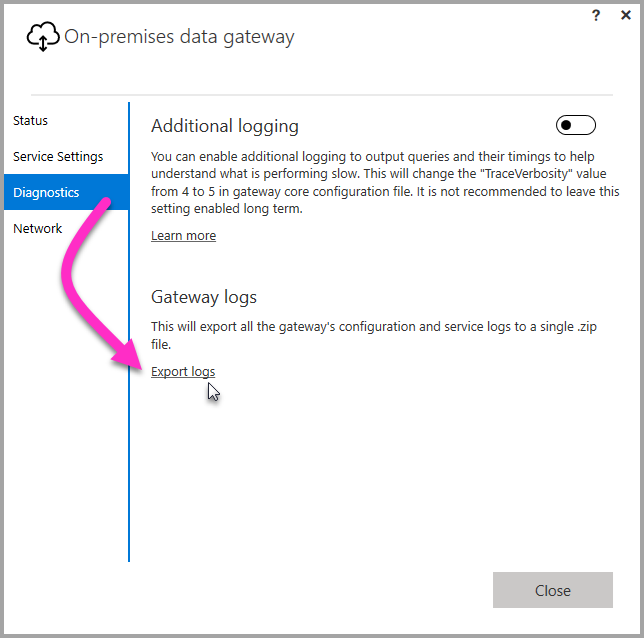
There are several logs you can collect for the gateway, and you should always start with the logs. The simplest way to collect logs after installing the gateway is through the user interface. In the On-premises data gateway user interface, select Diagnostics and then select the Export logslink near the bottom of the page, as shown in the following image.
Installer logs
%localappdata%\Temp\On-premises_data_gateway_*.log
Configuration logs
%localappdata%\Microsoft\On-premises Data Gateway\GatewayConfigurator*.log
On-premises data gateway service logs
C:\Users\PBIEgwService\AppData\Local\Microsoft\On-premises Data Gateway\Gateway*.log
Event Logs
The On-premises data gateway service event logs are present under Application and Services Logs.

Fiddler Trace
Fiddler is a free tool from Telerik that monitors HTTP traffic. You can see the back and forth with the Power BI service from the client machine. This may show errors and other related information.

Regards,
Xiaoxin Sheng