Join us at FabCon Atlanta from March 16 - 20, 2026, for the ultimate Fabric, Power BI, AI and SQL community-led event. Save $200 with code FABCOMM.
Register now!The Power BI Data Visualization World Championships is back! Get ahead of the game and start preparing now! Learn more
Good afternoon.
How to upload information about user access to reports and workspaces, data sets? What access is needed and which application?
Please give recommendations.
Sincerely, Pavel.
Solved! Go to Solution.
Hi @Anonymous ,
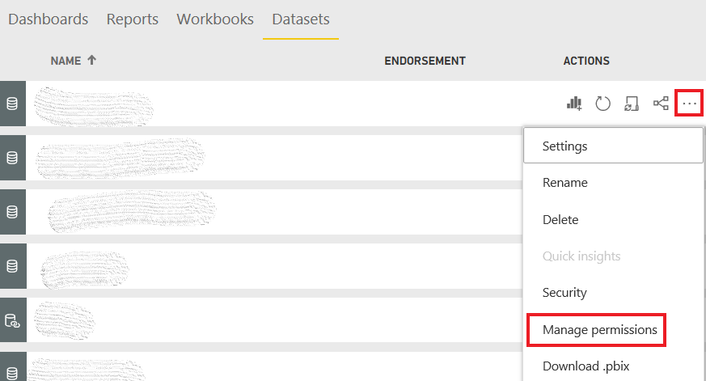
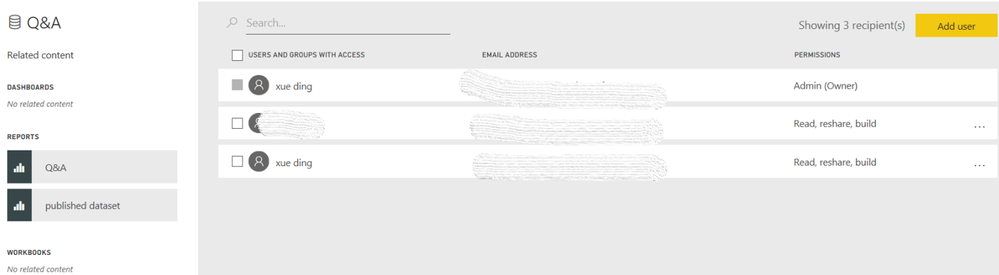
Currently, it is impossible to get all the access information directly. You could try to use API > Groups - Get Group Users to get a list of users that have access to the specified workspace. For datasets, you might need to get it in the list of "Manage permissions".
Then you could create a table using the access information in Power BI Desktop and republish it to Service.
Best Regards,
Xue Ding
If this post helps, then please consider Accept it as the solution to help the other members find it more quickly. Kudos are nice too.
Hi @Anonymous ,
Currently, it is impossible to get all the access information directly. You could try to use API > Groups - Get Group Users to get a list of users that have access to the specified workspace. For datasets, you might need to get it in the list of "Manage permissions".
Then you could create a table using the access information in Power BI Desktop and republish it to Service.
Best Regards,
Xue Ding
If this post helps, then please consider Accept it as the solution to help the other members find it more quickly. Kudos are nice too.
The Power BI Data Visualization World Championships is back! Get ahead of the game and start preparing now!
| User | Count |
|---|---|
| 56 | |
| 55 | |
| 37 | |
| 18 | |
| 14 |