cancel
Showing results for 
Search instead for 
Did you mean: 

The Power BI Data Visualization World Championships is back! Get ahead of the game and start preparing now! Learn more

Reply
siddhartha
Advocate II
Advocate II

Power Bi Service Issue - Line Chart Legends

I'm facing an issue with Legends in PowerBI, where it is working as expected in PowerBI Desktop whereas it is not on PowerBI service. I believe something has changed recently as it was working perfectly previously.

I've created a sample report to highlight the issue. Here is the query used -

select *
from
(
select 'A' AS Typ, CAST('2017-04-21' AS Date) AS Dt, 10 As X, 20 AS Y, NULL AS Z
union all
select 'A' AS Typ, CAST('2017-04-22' AS Date) AS Dt, 15 As X, 20 AS Y, NULL AS Z
union all
select 'A' AS Typ, CAST('2017-04-23' AS Date) AS Dt, 18 As X, 20 AS Y, NULL AS Z
union all
select 'A' AS Typ, CAST('2017-04-24' AS Date) AS Dt, 22 As X, 20 AS Y, NULL AS Z
union all
select 'A' AS Typ, CAST('2017-04-25' AS Date) AS Dt, 19 As X, 20 AS Y, NULL AS Z
union all
select 'B' AS Typ, CAST('2017-04-21' AS Date) AS Dt, NULL As X, 20 AS Y,23 AS Z
union all
select 'B' AS Typ, CAST('2017-04-22' AS Date) AS Dt, NULL As X, 20 AS Y,18 AS Z
union all
select 'B' AS Typ, CAST('2017-04-23' AS Date) AS Dt, NULL As X, 20 AS Y,15 AS Z
union all
select 'B' AS Typ, CAST('2017-04-24' AS Date) AS Dt, NULL As X, 20 AS Y,22 AS Z
union all
select 'B' AS Typ, CAST('2017-04-25' AS Date) AS Dt, NULL As X, 20 AS Y,10 AS Z
) a


In PowerBI desktop , when I select A as Typ, it only shows X and Y in the Legend. (which is expected)
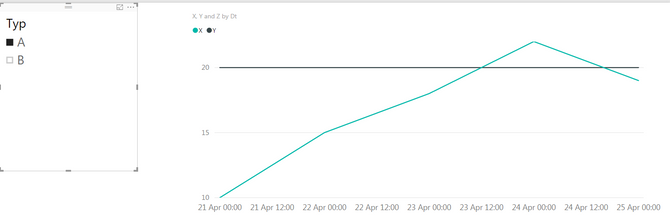
 desktop.PNG

however on the PowerBi Service, the same report with same slicer selected shows all the legends namely X,Y and Z. here is the snapshot -
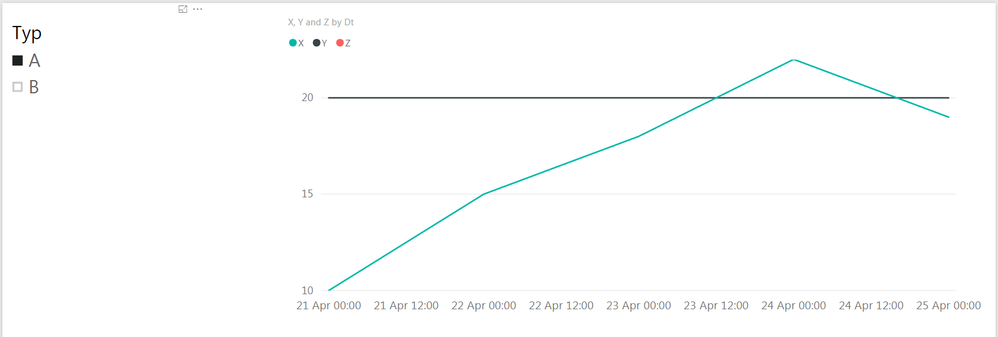
service.PNG


thanks

Sid


5 REPLIES 5
v-haibl-msft
Microsoft Employee
Microsoft Employee

@siddhartha


I've got response from the Product Team.


The previous behavior was incorrect, and this is by design. When you create a legend by using multiple values, all values are always supposed to show up in the legend.


Best Regards,
Herbert

Hi Herbert,

The previous feature seems to be working for the scenario where either of the values can be present. (not both).

Our production dashboards were working properly using the previous feature and working properly. however it is not with these changes .


thanks

Sid


Anonymous
Not applicable

Hi @siddhartha,

Which version of Power BI Desktop do you use? I test your scenario in the latest version of Power BI Desktop(Version: 2.46.4732.461 64-bit (May 2017)), when I select A in Typ slicer, it also shows X,Y and Z in the Legend, which acts like that in Power BI Service.

1.PNG

Thanks,
Lydia Zhang

Hi Lydia,

I'm using Power BI Desktop Version - 2.45.4704.442 64-bit (April 2017). I can update to the latest version, however for this particular feature, I believe the April version was a better represntation. The reason being, if I do not see any data points related to the specific legend, there is no point of showing it either.


Thanks

Sid 

Anonymous
Not applicable

Hi @siddhartha,

I will report this issue internally and post back once I get any updates.

Thanks,
Lydia Zhang

Helpful resources

Announcements
Power BI DataViz World Championships

Power BI Dataviz World Championships

The Power BI Data Visualization World Championships is back! Get ahead of the game and start preparing now!

December 2025 Power BI Update Carousel

Power BI Monthly Update - December 2025

Check out the December 2025 Power BI Holiday Recap!

FabCon Atlanta 2026 carousel

FabCon Atlanta 2026

Join us at FabCon Atlanta, March 16-20, for the ultimate Fabric, Power BI, AI and SQL community-led event. Save $200 with code FABCOMM.