cancel
Showing results for 
Search instead for 
Did you mean: 

Vote for your favorite vizzies from the Power BI Dataviz World Championship submissions. Vote now!

Reply
BananaLee
Frequent Visitor

Power BI Gateway Says I'm Connected, Power BI Says I'm Not

Have a bit of a conundrum here with regards to my Personal Gateway.


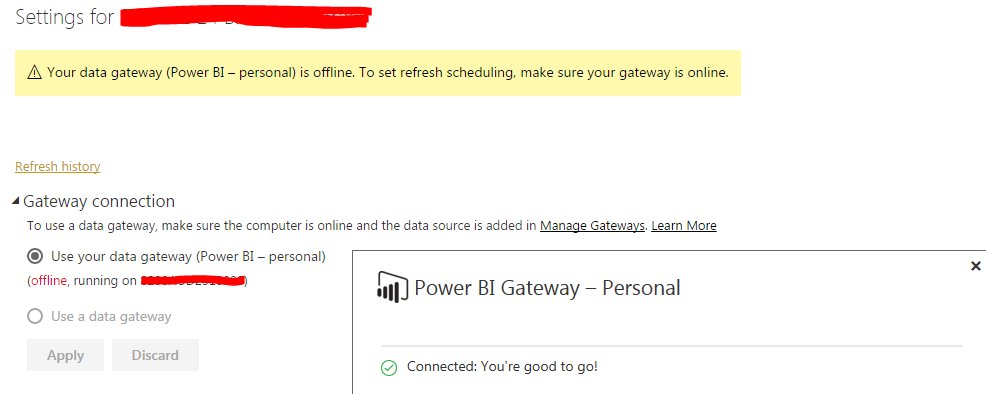
When opening my gateway, it says I'm good to go; however, looking at the "schedule refresh" on Power BI, it says my computer is offline (Note that I'm running off the one computer). Is there any reason why it would show these contradicting messages? Screenshot to illustrate.


Capture.PNG

3 REPLIES 3
GilbertQ
Super User
Super User

I had a similar issue and what I did was to CTRL + F5 in the browser to see if that helps?


I also restarted my laptop.


And when that still failed I then un-installed and re-installed which solved the issue.


Did I answer your question? Mark my post as a solution!

Proud to be a Super User!


Power BI Blog

kcantor
Community Champion
Community Champion

I have found the same issue with my gateway on my laptop. I believe it is due to using different networks for connectivity. When I work from home, my personal gateway doesn't readily connect when I am at work (to the service only) yet says it is connected on my laptop.

Other than keeping my gateway up to date, I have found that giving my gateway a little time to stabalize before connecting to the service helps prevent this issue. In the past, I booted up the service as my laptop was first starting.

In addition, I have also switched to the on premise data gateway. Unfortunately, it tends to act the same way on a laptop so we are moving this gateway to a server.


Did I answer your question? Mark my post as a solution!

Proud to be a Super User!


Anonymous
Not applicable

Hi @BananaLee,

Firstly, please make sure that you download the latest version of Power BI Gateway from this link.

Secondly, install personal gateway and configure it following the instructions in this article and then check if the issue persists.

Besides, is there any possibility that you use on-premises gateway to refresh your dataset?

Thanks,
Lydia Zhang

Helpful resources

Announcements
Power BI DataViz World Championships

Power BI Dataviz World Championships

Vote for your favorite vizzies from the Power BI World Championship submissions!

Sticker Challenge 2026 Carousel

Join our Community Sticker Challenge 2026

If you love stickers, then you will definitely want to check out our Community Sticker Challenge!

January Power BI Update Carousel

Power BI Monthly Update - January 2026

Check out the January 2026 Power BI update to learn about new features.

FabCon Atlanta 2026 carousel

FabCon Atlanta 2026

Join us at FabCon Atlanta, March 16-20, for the ultimate Fabric, Power BI, AI and SQL community-led event. Save $200 with code FABCOMM.