cancel
Showing results for 
Search instead for 
Did you mean: 

The Power BI Data Visualization World Championships is back! Get ahead of the game and start preparing now! Learn more

Reply
maivarss
Microsoft Employee
Microsoft Employee

Personal Gateway migration error

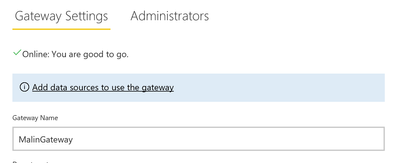
I have recently changed computer, and tried to migrate my personal gateway to point to my new computer and not my old one, Migration seemed to work fine, and when going to Manage Gateways, my gateway is now stated as Online (see pic below). However, when trying to refresh / schedule refresh, I still get the message that the personal gatway is offline, despite it being online under Manage Gateways. I get the same issue with both old (e.g. uploaded before migrating the gateway) and new datasets uploaded (uploaded after gateway migration). Can you please help? I'm turning desparate here... GatewayOnline.PNG


1 REPLY 1
v-haibl-msft
Microsoft Employee
Microsoft Employee

@maivarss


The status in Gateway Settings is for on-premises gateway but not personal gateway. If the on-premises gateway is online, you can use it instead.

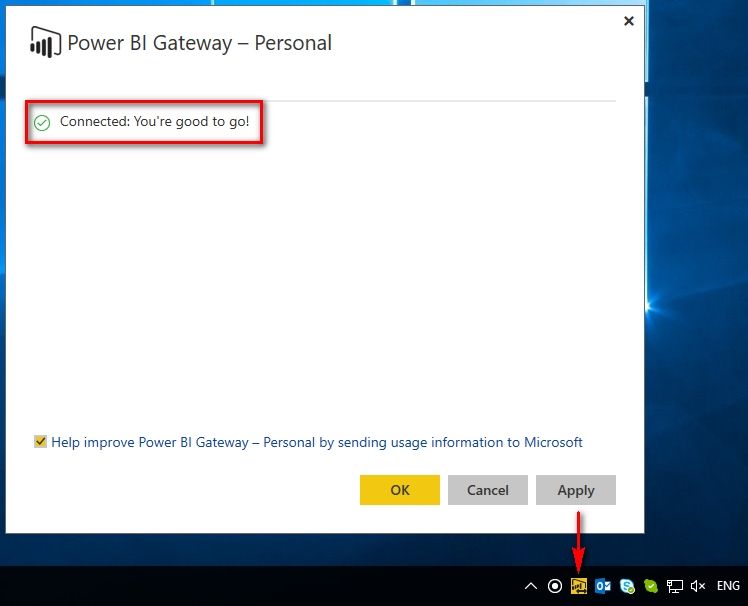
If you want to use personal gateway, you need to check the status by clicking the personal gateway icon in the lower right corner as following screenshot.


Personal Gateway migration error_1.jpg 


Best Regards,

Herbert

Helpful resources

Announcements
Power BI DataViz World Championships

Power BI Dataviz World Championships

The Power BI Data Visualization World Championships is back! Get ahead of the game and start preparing now!

December 2025 Power BI Update Carousel

Power BI Monthly Update - December 2025

Check out the December 2025 Power BI Holiday Recap!

FabCon Atlanta 2026 carousel

FabCon Atlanta 2026

Join us at FabCon Atlanta, March 16-20, for the ultimate Fabric, Power BI, AI and SQL community-led event. Save $200 with code FABCOMM.