cancel
Showing results for 
Search instead for 
Did you mean: 

Get Fabric Certified for FREE during Fabric Data Days. Don't miss your chance! Request now

Reply
jhills
Advocate II
Advocate II

Is there a way to see which gateway connection a dataflow query is using?

I need to switch some dataflow queries to use a different connection in our enterprise gateway. I use to be able to see it in dataflow settings under gateway connection. But that has moved to power query online. I have not been able to find where in power query online I can view the selected connection in the gateway a datasource is using.


If you know how to view this, please point me in the right direction.

Thanks

1 ACCEPTED SOLUTION
jhills
Advocate II
Advocate II

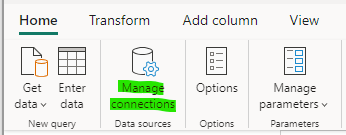
This can now be viewed under "Manage Connections" when editing the dataflow.

jhills_0-1692115591349.png


View solution in original post

4 REPLIES 4
jhills
Advocate II
Advocate II

This can now be viewed under "Manage Connections" when editing the dataflow.

jhills_0-1692115591349.png


lbendlin
Super User
Super User

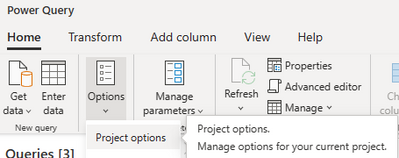
lbendlin_0-1681253286555.png


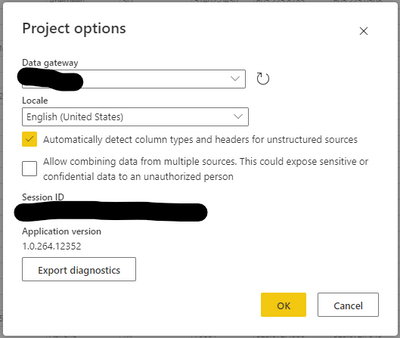
Thanks for your reply. I have looked in project options but that only tells me which gateway is being used. It does not tell me which connection on the gateway is being used. Do you know where to look to see which connection is being used?


jhills_0-1681310853754.png


When you are in the dataflow settings dialog you can use the browser dev tools to look at the HTTP requests. One of them is called "config" and contains the connection details.

Helpful resources

Announcements
November Power BI Update Carousel

Power BI Monthly Update - November 2025

Check out the November 2025 Power BI update to learn about new features.

Fabric Data Days Carousel

Fabric Data Days

Advance your Data & AI career with 50 days of live learning, contests, hands-on challenges, study groups & certifications and more!

FabCon Atlanta 2026 carousel

FabCon Atlanta 2026

Join us at FabCon Atlanta, March 16-20, for the ultimate Fabric, Power BI, AI and SQL community-led event. Save $200 with code FABCOMM.

Top Solution Authors
Top Kudoed Authors