cancel
Showing results for 
Search instead for 
Did you mean: 

Get Fabric Certified for FREE during Fabric Data Days. Don't miss your chance! Request now

Reply
GDSHAW
Advocate I
Advocate I

Is External sharing possible with data set that use RLS ?

Internal sharing is working fine but when i go for external sharing, it is showing a warning message " one or more email addresses are outside your organisation" and hence not allowing me to add further. Please suggest. 

1 ACCEPTED SOLUTION
Anonymous
Not applicable

Hi @GDSHAW,

Do you mean that you are not able to add external member to the role of RLS dataset(as shown in the following screenshot)? If that is the case, as stated in this article, external sharing is not currently supported with datasets that use RLS. Members of role have to be within your organization, it indicates that when configuring RLS, people are added as members should use email accounts with same suffix (for example: username1@contoso.com, username2@contoso.com).
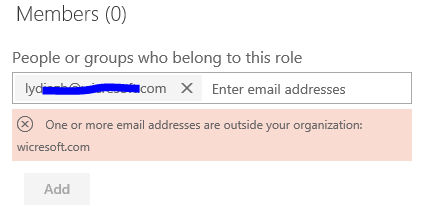
Capture.PNG


In addition, users will not able to see anything in the dashboard unless you add them as members to RLS roles. Thus, it doesn't make sense to share the dashboard that has RLS configured visuals to external users even if Power BI will not prevent you from sharing such dashboard.


Thanks,
Lydia Zhang

View solution in original post

3 REPLIES 3
Anonymous
Not applicable

Hi,


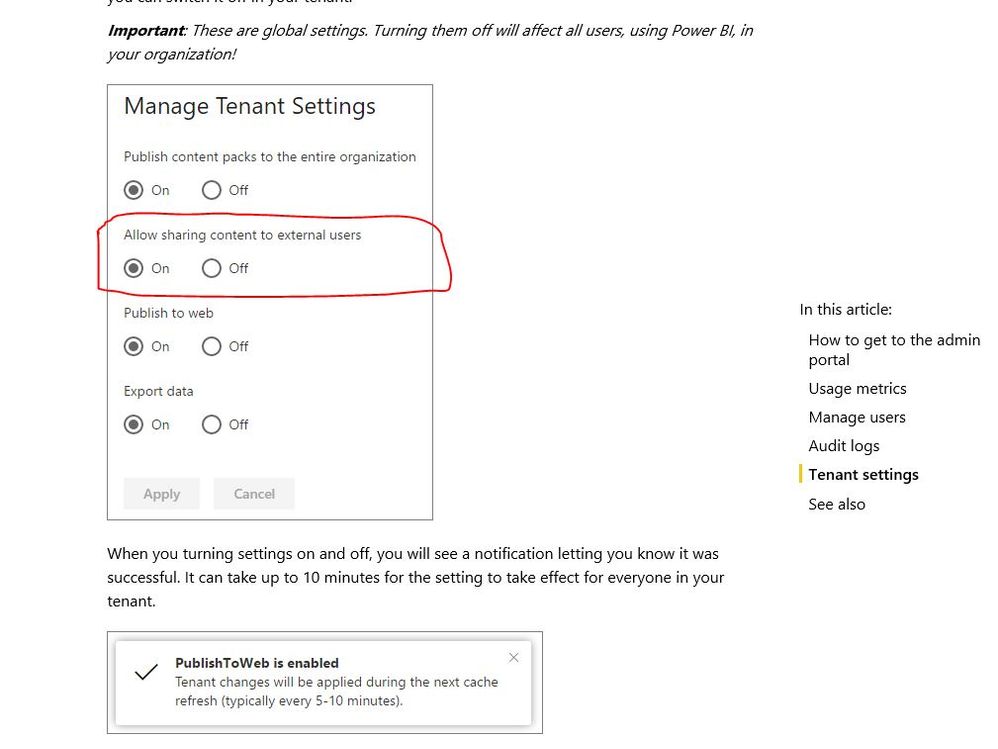
Is this the first time you are trying to share the dashboard with external users? If that is the case, then external sharing may have been disabled by PowerBI Admin, as highlighted in the image below.


PowerBIAdmin.JPG


For more information on PowerBI Administration, visit, https://powerbi.microsoft.com/en-us/documentation/powerbi-admin-portal/


Hope this is helpful.


Regards,

Ashish

Anonymous
Not applicable

Hi @GDSHAW,

Do you mean that you are not able to add external member to the role of RLS dataset(as shown in the following screenshot)? If that is the case, as stated in this article, external sharing is not currently supported with datasets that use RLS. Members of role have to be within your organization, it indicates that when configuring RLS, people are added as members should use email accounts with same suffix (for example: username1@contoso.com, username2@contoso.com).
Capture.PNG


In addition, users will not able to see anything in the dashboard unless you add them as members to RLS roles. Thus, it doesn't make sense to share the dashboard that has RLS configured visuals to external users even if Power BI will not prevent you from sharing such dashboard.


Thanks,
Lydia Zhang

ankitpatira
Community Champion
Community Champion

@GDSHAW When you go to share and share it with email address that is outside organisation you get warning sign but that will not stop you from sharing. You will still be able to share.

But once shared users outside your organisation will not be able to see anything for that dashboard as you will have RLS enabled on that dataset.

Helpful resources

Announcements
November Power BI Update Carousel

Power BI Monthly Update - November 2025

Check out the November 2025 Power BI update to learn about new features.

Fabric Data Days Carousel

Fabric Data Days

Advance your Data & AI career with 50 days of live learning, contests, hands-on challenges, study groups & certifications and more!

FabCon Atlanta 2026 carousel

FabCon Atlanta 2026

Join us at FabCon Atlanta, March 16-20, for the ultimate Fabric, Power BI, AI and SQL community-led event. Save $200 with code FABCOMM.

Top Solution Authors
Top Kudoed Authors