cancel
Showing results for 
Search instead for 
Did you mean: 

The Power BI Data Visualization World Championships is back! Get ahead of the game and start preparing now! Learn more

Reply
Anonymous
Not applicable

How to share programmaticaly a report

Hello,


I have an existing report that i want to share to external organisation users through my user portal.

The users when they log in my portal must only see there own data in the report (multi customer report).

The solution have to be programmaticaly as there are more users every week.

The solution must be cost efficient.


1) What is the best solution for this ? Embedded server dedicated capacity seems the best solution to do this programmaticaly ?


2) What about licensing ? Do i need one powerbi pro licence by user ?


3) Can you provide me a good documentation explaining this in details?


Thank you for your time !


1 ACCEPTED SOLUTION
npergand
Helper II
Helper II

Embedded is probably the best option for what you are looking for.


Here is the documentation on Embedded
https://docs.microsoft.com/en-us/power-bi/developer/embedded/


This doc explains what it is:
https://docs.microsoft.com/en-us/power-bi/developer/embedded/embedded-analytics-power-bi


Since you have an external user use case, you are probably looking to performing the "embed for you customers" method


Here is how you would implement it using a service principle:
https://docs.microsoft.com/en-us/power-bi/developer/embedded/embed-service-principal


Here is information on the licensing/pricing options:
https://docs.microsoft.com/en-us/power-bi/developer/embedded/embedded-capacity

View solution in original post

3 REPLIES 3
npergand
Helper II
Helper II

Embedded is probably the best option for what you are looking for.


Here is the documentation on Embedded
https://docs.microsoft.com/en-us/power-bi/developer/embedded/


This doc explains what it is:
https://docs.microsoft.com/en-us/power-bi/developer/embedded/embedded-analytics-power-bi


Since you have an external user use case, you are probably looking to performing the "embed for you customers" method


Here is how you would implement it using a service principle:
https://docs.microsoft.com/en-us/power-bi/developer/embedded/embed-service-principal


Here is information on the licensing/pricing options:
https://docs.microsoft.com/en-us/power-bi/developer/embedded/embedded-capacity

Anonymous
Not applicable

Hello,


First thank you for your time.


If i understand well, service principale will be used to provide PI embedded user authentication through AD ?

This mean users in my AD included in a RLS policy can only see their own data right ?


Then it is mandatory to have those users in AD to share a report with RLS right ?

This is also mandatory to have one PRO licence per user ?


Regards.

Using the "embed for you customers" method.

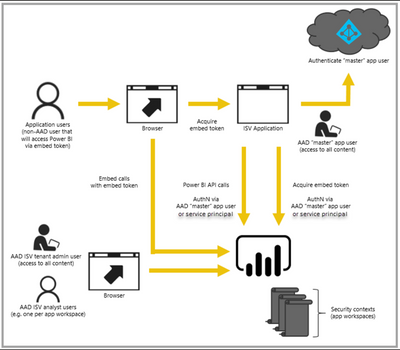
You would use a Service Principle to authenticate to your AD and embed the report within your Application. I like the following graphic that illustrates the process (this came from a MS doc, but I can no longer find where I got it):
npergand_0-1637333520349.png

This tutorial article walks you through step by step how to setup and configure this:

https://docs.microsoft.com/en-us/power-bi/developer/embedded/embed-sample-for-customers


You will need a Pro License (1 license per author) to author the reporting.

If you use the Service Principle for embedding, you do not need a Pro License for it.


External Users do not need to be in your AD, as the Application is responsible for authentication.


RLS presents a challenge if the user is not in your AD, but you can accomplish proper RLS filtering by setting the CustomData property in your EffectiveIdentity to the external user and building your RLS query to be based off of that value (DAX: CUSTOMDATA())

Helpful resources

Announcements
Power BI DataViz World Championships

Power BI Dataviz World Championships

The Power BI Data Visualization World Championships is back! Get ahead of the game and start preparing now!

December 2025 Power BI Update Carousel

Power BI Monthly Update - December 2025

Check out the December 2025 Power BI Holiday Recap!

FabCon Atlanta 2026 carousel

FabCon Atlanta 2026

Join us at FabCon Atlanta, March 16-20, for the ultimate Fabric, Power BI, AI and SQL community-led event. Save $200 with code FABCOMM.