cancel
Showing results for 
Search instead for 
Did you mean: 

Get Fabric Certified for FREE during AI Skills Fest. This week only. Secure your voucher now.

Reply
JaSp
New Member

Grouping of Multiple Columns in PowerBI-Service

Hi all,


I am unfortunately stuck at a visualisation issue within the PowerBI Online App. 


The data I'd like to analyse/visualise is structured as follows:


Title | LocationA | LocationB | LocationC | Publisher1 | Publisher2


Title contains distinct datapoints whereas Location and Publisher contain repeating datapoints (there is one type of type listed in the TypeA column. Here's an example:


The issue is that columns B, C, D and E, F all represent datapoints related to the same category (Publish-Location for B, C, D and Publisher for E, F). However, if I want to create a visualization showing where and by whom my ads have been published (e.g. a bar graph with 3 bars for the publishing locations and a graphical sub-division per bar for each publisher) .


Is there any way to group those colums or tell PowerBI that they contain data from the same category (Location and Publisher)?


Thanks for your help!


Jan


2 REPLIES 2
v-danhe-msft
Microsoft Employee
Microsoft Employee

Hi @JaSp,

Could you please tell me if your problem has been solved? If it is, could you please mark the helpful replies as Answered?


Regards

Daniel He

Community Support Team _ Daniel He
If this post helps, then please consider Accept it as the solution to help the other members find it more quickly.
v-danhe-msft
Microsoft Employee
Microsoft Employee

Hi @JaSp,


Based on my test, you could refer to below steps:

Sample data:

1.PNG

Unpivot all the columns except [Title] in query editor:

1.PNG

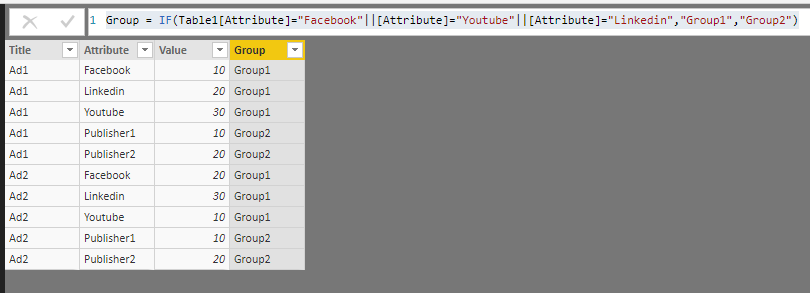
Apply it and create a calculated column in data view:

Group = IF(Table1[Attribute]="Facebook"||[Attribute]="Youtube"||[Attribute]="Linkedin","Group1","Group2")

1.PNG

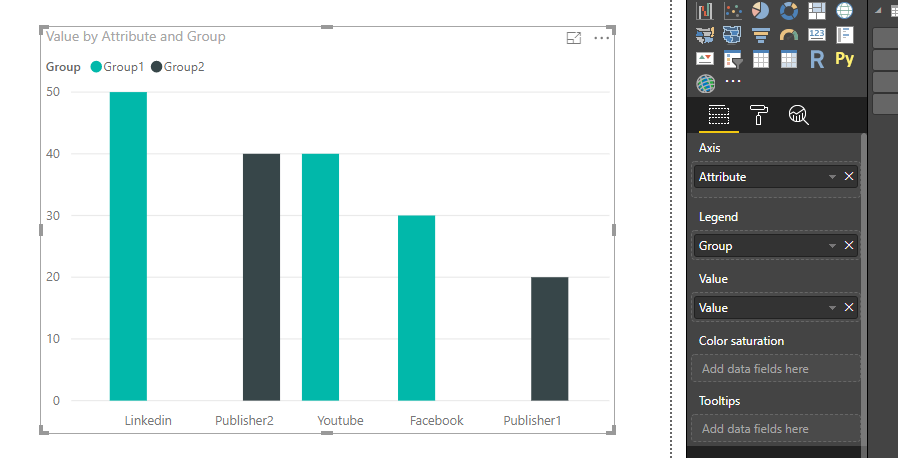
Now you could create a bar chart and use the Group as legend and publish to service:

1.PNG

You could also download the pbix file to have a view.


Regards,

Daniel He


Community Support Team _ Daniel He
If this post helps, then please consider Accept it as the solution to help the other members find it more quickly.

Helpful resources

Announcements
May Power BI Update Carousel

Power BI Monthly Update - May 2026

Check out the May 2026 Power BI update to learn about new features.

Fabric SQL PBI Data Days

Data Days 2026 coming soon!

Sign up to receive a private message when registration opens and key events begin.

New to Fabric survey Carousel

New to Fabric Survey

If you have recently started exploring Fabric, we'd love to hear how it's going. Your feedback can help with product improvements.

Power BI DataViz World Championships carousel

Power BI DataViz World Championships - June 2026

A new Power BI DataViz World Championship is coming this June! Don't miss out on submitting your entry.