
Join us at FabCon Atlanta from March 16 - 20, 2026, for the ultimate Fabric, Power BI, AI and SQL community-led event. Save $200 with code FABCOMM.
Register now!The Power BI Data Visualization World Championships is back! Get ahead of the game and start preparing now! Learn more
Hi everyone,
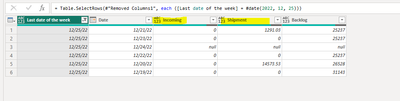
I am struggling with grouping the below set of data:
1) Firstly, I want to group the highlited columns. My final result should be: one row with date and total amounts for both columns
2) Secondly, I need to group the backlog - need to receive the last value from the last row (31143).
Does anyone know how to solve this?
Thank you!
Solved! Go to Solution.
Hi @alice25
Here you go:
Attaching the file for your reference.
Hi @alice25
It would be great if you can share the sample data with me and the expected output.
Hi Ankit,
Sample data:
| Last date of the week | Incoming | Shipment | Backlog |
| 12/25/22 | 0 | 1291.03 | 25237 |
| 12/25/22 | 0 | 0 | 25237 |
| 12/25/22 | null | null | null |
| 12/25/22 | 0 | 0 | 25237 |
| 12/25/22 | 0 | 14573.53 | 26528 |
| 12/25/22 | 0 | 0 | 31143 |
Expected:
| Last date of the week | Incoming | Shipment | Backlog |
| 12/25/22 | 0 | 15864.56 | 31143 |
Thank you!
Hi @alice25
Here you go:
Attaching the file for your reference.
Hi Ankit,
Thanks! There is one issue with backlog value - it will not be always max value.
Please find below the example:
| Last date of the week | Incoming | Shipment | Backlog |
| 12/18/22 | 5036.31 | 0 | 31782 |
| 12/18/22 | 0 | 0 | 31143 |
| 12/18/22 | 0 | 1988.02 | 31143 |
| 12/18/22 | 0 | 0 | 26746 |
| 12/18/22 | 0 | 0 | 26746 |
Expected:
| Last date of the week | Incoming | Shipment | Backlog |
| 12/18/22 | 5036.31 | 1988.02 | 26746 |
Hi @alice25
Not possible with group by as we can choose either max, min, sum, avg, count etc with the group by.
The Power BI Data Visualization World Championships is back! Get ahead of the game and start preparing now!
| User | Count |
|---|---|
| 58 | |
| 56 | |
| 35 | |
| 18 | |
| 14 |