Join us at FabCon Atlanta from March 16 - 20, 2026, for the ultimate Fabric, Power BI, AI and SQL community-led event. Save $200 with code FABCOMM.
Register now!The Power BI Data Visualization World Championships is back! Get ahead of the game and start preparing now! Learn more
Hi all,
We are trying to download the pbix from a report in the service but are getting an error saying "Can't export to pbix format"
The reported Status code is 500
Any idea what might be causing this?
Many thanks
Hi @AlB
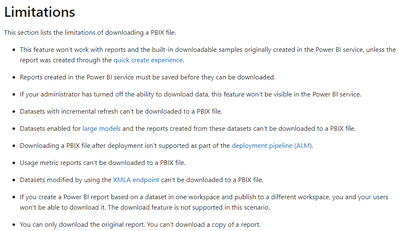
You can troubleshoot through the limitations of Download the .pbix file in Service .
https://docs.microsoft.com/en-us/power-bi/create-reports/service-export-to-pbix#limitations
Best Regards
Community Support Team _ Ailsa Tao
If this post helps, then please consider Accept it as the solution to help the other members find it more quickly.
Hi @AlB
The size is around 25 mbs. But model is complex - 15 tables, most of them from different SQL servers and 2 different sharepoint sites was connected as data sources.
Just downloaded after turn-off "Large Dataset storage format" in dataset settings.
Hi,
Just checked. I have the same issue. I can't download big complex .pbix files. With small reports everthing is fine. Same status code 500
The Power BI Data Visualization World Championships is back! Get ahead of the game and start preparing now!