Don't miss your chance to take the Fabric Data Engineer (DP-600) exam for FREE! Find out how by attending the DP-600 session on April 23rd (pacific time), live or on-demand.
Learn moreNext up in the FabCon + SQLCon recap series: The roadmap for Microsoft SQL and Maximizing Developer experiences in Fabric. All sessions are available on-demand after the live show. Register now
I have several Dataflows in a single workspace and from time to time one or more of them will randomly fail to refresh. I cannot see why they are failing. One day they work, the next they fail, the day after that they work again. Sometimes they fail after 10 minutes of an attempted refresh, other times it could be 50 minutes. How can I get more diagnostic information for each Dataflow so that I can understand what is happening.
The sources for the Dataflows are either SharePoint Online lists or Azure SQL. It seemingly does not matter about the sizes of the sources. Big or small they randomly fail.
I thought refresh concurrency would be an issue so I spaced each one apart by 1 hour but that made no difference. Is there a limit on concurrency?
The service does seem very fragile.
I have the same issue in a workspace integrated with Azure Datalake gen 2. Ramdomicaly fails in different tables of Azure SQL. Sometimes fails on SQL tables, others reading CSVs from Datalake.
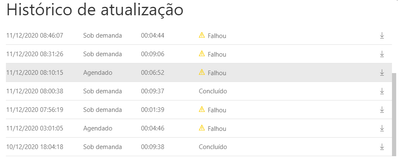
The errors are bellow:
| 12/11/2020 09:08:51,SQL XXX Dimensoes,Falhou,dUsuario,11/12/2020 09:13:33,11/12/2020 09:15:05,Falhou,Error: DataSource.Error: AzureDataLakeStorage failed to get contents from 'https://abc.dfs.core.windows.net/powerbi/abc-datalake/SQL%20ABC%20Dimensoes/dUsuario.csv?sp=w&sv=201...'. Status code: 500 description: 'Operation could not be completed within the specified time.'. Request ID: 3eafa915-6e31-a779-7773-6882e29c104b Activity ID: 8e7fc620-f0f2-4280-97e5-12d529d48d2d |
| 12/11/2020 08:46:07,SQL XXX Dimensoes,Falhou,dItem,11/12/2020 08:49:19,11/12/2020 08:50:51,Falhou,Error: DataSource.Error: AzureDataLakeStorage failed to get contents from 'https://abc.dfs.core.windows.net/powerbi/abc-datalake/SQL%20abc%20Dimensoes/dItem.csv?sp=w&sv=2018-0...'. Status code: 500 description: 'Operation could not be completed within the specified time.'. Request ID: 664f3a8c-c95a-d1a8-91c4-23ea8e31eb89 Activity ID: d1ac7baa-b03e-4afe-8389-84d6f32c5c8e |
| 12/11/2020 08:10:15,SQL xxx Dimensoes,Falhou,dStatusOrcamento,11/12/2020 08:16:08,11/12/2020 08:17:08,Falhou,Error: Internal error Request ID: 14c4293f-c93f-468c-a437-89f0215881cb Activity ID: f6d797e1-c67d-4cd4-b5b1-50fab17a1b13 |
Same issue (w other sources, on prem files & odata) here. There is definitly a need to at least enhance the error messages, so that users get a clue what problem occured.
KR
Alex
If you have recently started exploring Fabric, we'd love to hear how it's going. Your feedback can help with product improvements.
A new Power BI DataViz World Championship is coming this June! Don't miss out on submitting your entry.
Share feedback directly with Fabric product managers, participate in targeted research studies and influence the Fabric roadmap.