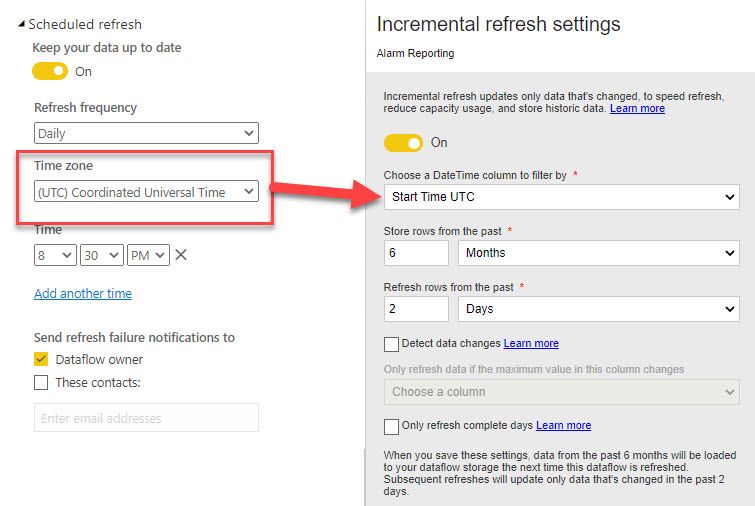
I spent the best part of today trying to figure out why some computed entities were missing data. I worked my way backwards and I think I found the issue.
I'd always assumed that the datetime value that you use for incremental refresh was to be in UTC. Then over in the area where you schedule your dataflow refresh, you can choose a timezone - and I always figured that was for the benefit of the dataflow author to make it easy to visualise the time of data when they want it to run.
wrong (I think).
These two settings are linked.
The timezone that you use to schedule the refresh - specifies the timezone for the datetime value that use to incrementally refresh.
In my case, i'd always had my schedule in Brisbane time, and I'd always had my datetime column in UTC.
After I changed by schedule to be in UTC to match with the column I was using for incremental refresh - the missing data appeared.
I think this is a bit of a gothcha, as choosing the timezone to refresh - seems like a rather inocuous setting to just help with understanding time of day, NOT specifying the timezone of the field to refresh !
Ideally i'd like these to be separate - selecting timezone for refresh timing - selecting timezone of column used for inc refresh.
This is mentioned in microsoft article : https://docs.microsoft.com/en-us/power-query/dataflows/incremental-refresh
Dataflow incremental refresh determines dates according to the following logic: if a refresh is scheduled, incremental refresh for dataflows uses the time zone defined in the refresh policy. If no schedule for refreshing exists, incremental refresh uses the time from the computer running the refresh.