cancel
Showing results for 
Search instead for 
Did you mean: 

The Power BI Data Visualization World Championships is back! Get ahead of the game and start preparing now! Learn more

Reply
mgrowan
Regular Visitor

Data Set refreshes but no new data on Azure SQL Database connection

I have a report I've built in Power BI Desktop connecting to an Azure SQL Database.

At first it was connected using Data Connectivity Mode Direct Query. I published and all was good, refresh showed the new data in the database.


I then added some more things to the report and had to switch from Direct Query to Import to allow the adding of a Date dimension. Refreshing locally on Power BI Desktop works fine and I published the report.


Now however the report does not show the latest data on the service. The Data Set shows that the scheduled cache refresh is configured and the history shows it is refreshing and I can "refresh now" without error, but the new data from the database has not been included.


What am I missing?


1 ACCEPTED SOLUTION
Anonymous
Not applicable

@mgrowan,

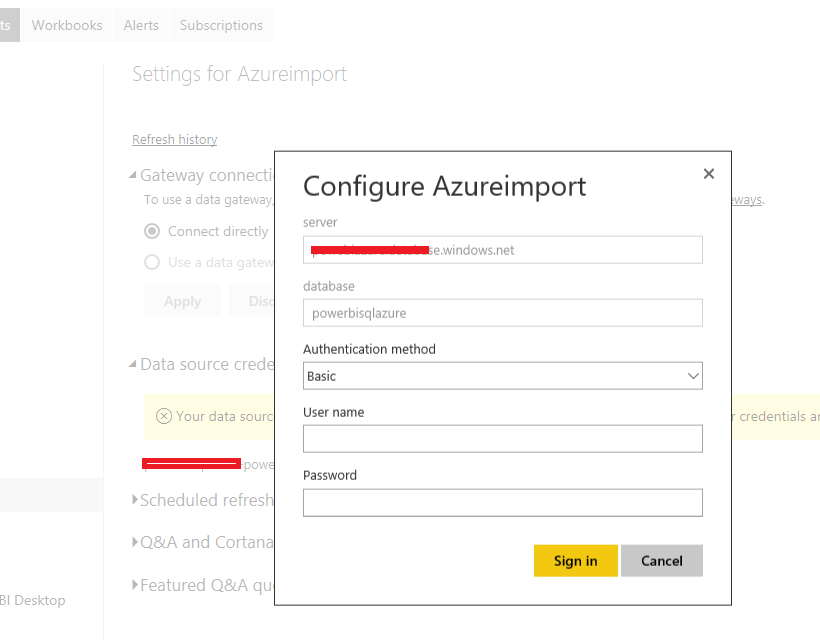
After you change "DirectQuery” to “import” mode, please remove your dataset in Power BI Service, then re-publish your PBIX file to Power BI Service, enter credential for your data source as shown in the following similar screenshot , set schedule refresh for your dataset. Then check if refresh works.

1.PNG


Regards,

View solution in original post

4 REPLIES 4
GilbertQ
Super User
Super User

hi @mgrowan


Would it not be now that you have set it to Import Mode that you have to configure the refresh from the Dataset under Settings?


Did I answer your question? Mark my post as a solution!

Proud to be a Super User!


Power BI Blog

Thanks @GilbertQ , under settings the schedule is set to hourly and the refresh history shows it has been successful each hour, but the data is still out of date. Is there somewhere else I should be setting it?
Anonymous
Not applicable

@mgrowan,

After you change "DirectQuery” to “import” mode, please remove your dataset in Power BI Service, then re-publish your PBIX file to Power BI Service, enter credential for your data source as shown in the following similar screenshot , set schedule refresh for your dataset. Then check if refresh works.

1.PNG


Regards,

Perfect, thanks @Anonymous!


After I delete the Data Set (report went too) and redeployed. I didn't need to reset credential, but set the daily scheduled refresh and all is updating.

Helpful resources

Announcements
Power BI DataViz World Championships

Power BI Dataviz World Championships

The Power BI Data Visualization World Championships is back! Get ahead of the game and start preparing now!

December 2025 Power BI Update Carousel

Power BI Monthly Update - December 2025

Check out the December 2025 Power BI Holiday Recap!

FabCon Atlanta 2026 carousel

FabCon Atlanta 2026

Join us at FabCon Atlanta, March 16-20, for the ultimate Fabric, Power BI, AI and SQL community-led event. Save $200 with code FABCOMM.