Forum Discussion

Connect Live - SSAS - Update Frequency

wmorris20 Are you referring to the new Service view where it shows the refresh time on the dataset? Or perhaps the dashboard?
Dashboard tiles should refresh every 15 minutes (this could be the 30 you are seeing)
I am assuming that the refresh times that show on the dataset are referring to that 15/30 for dashboard tiles because you should have access to the live data if you are actually interacting with the report visuals. I understand that there is more than likely a cache window for visual interaction, but it shouldn't be anywhere near 30 minutes...
Have you found that the data is actually old compared to what is in your model, or are you just referring to the refresh times as you see them?

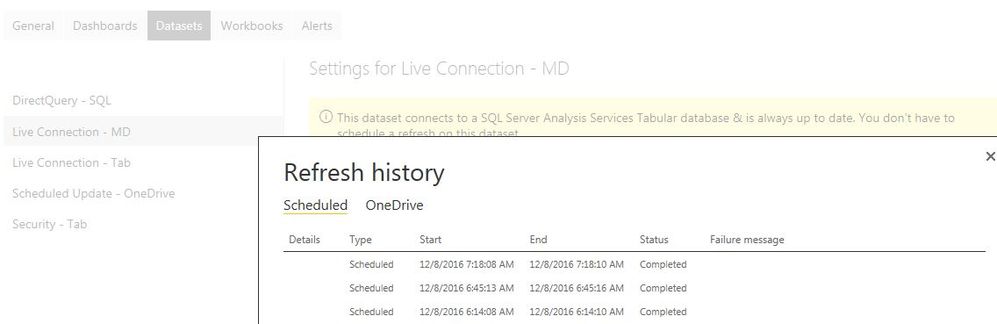
Thanks for your response. I'm good with the Dashboard refresh frequency. I'm referring to the refresh of the connection to the dataset/model. I know the model is updated on-premise in my test scenario, because I processed a simple value change. Once the next update shows in the refresh history, the report that's using the live connection dataset reflects the change. Thanks for any help you can offer.
- Anonymous9 years agoNot applicable
wmorris20 So when you refresh the model, and you interact with the report in the Service, what is the result? Do you see the new value, or not until this "refresh" happens?
I would expect that you should see the new value when you interact with your report, regardless of this refresh history.
I am also assuming that the only reason you see this on a live connection is the cache that supports the dashboard tiles is on this 30 minute schedule...
If either of the above are not correct, or not what you are seeing, I'm very interested...
- wmorris209 years agoHelper II
I added a slicer to the report thinking that it had to be a literal interaction and not just refreshing the page/report, but that didn't work either. Here are some examples using the Adventure Works data and manipulating sales amount:
Power BI Online:
On-Premise Version (Desktop):
Power BI Online after Refresh History shows update:
 v-qiuyu-msft9 years agoCommunity Support
Hi wmorris20,
As far as I know, if we connect to on-premise data sources use live connection or DirectQuery mode, when we interact with a visualization, queries are sent from Power BI directly to the database. Updated data is then returned and visualizations are updated. It's corresponding to the results which you have found. As schedule refresh is not supported in this scenario, we are not able to set refresh frequency. For more information, please refer to this article: Live connections and DirectQuery to on-premises data sources.
Best Regards,
Qiuyun Yu