FabCon is coming to Atlanta
Join us at FabCon Atlanta from March 16 - 20, 2026, for the ultimate Fabric, Power BI, AI and SQL community-led event. Save $200 with code FABCOMM.
Register now!- Power BI forums
- Get Help with Power BI
- Desktop
- Service
- Report Server
- Power Query
- Mobile Apps
- Developer
- DAX Commands and Tips
- Custom Visuals Development Discussion
- Health and Life Sciences
- Power BI Spanish forums
- Translated Spanish Desktop
- Training and Consulting
- Instructor Led Training
- Dashboard in a Day for Women, by Women
- Galleries
- Data Stories Gallery
- Themes Gallery
- Contests Gallery
- QuickViz Gallery
- Quick Measures Gallery
- Visual Calculations Gallery
- Notebook Gallery
- Translytical Task Flow Gallery
- TMDL Gallery
- R Script Showcase
- Webinars and Video Gallery
- Ideas
- Custom Visuals Ideas (read-only)
- Issues
- Issues
- Events
- Upcoming Events
Get Fabric Certified for FREE during Fabric Data Days. Don't miss your chance! Request now
- Power BI forums
- Forums
- Get Help with Power BI
- Service
- Re: Build permission not working
- Subscribe to RSS Feed
- Mark Topic as New
- Mark Topic as Read
- Float this Topic for Current User
- Bookmark
- Subscribe
- Printer Friendly Page

- Mark as New
- Bookmark
- Subscribe
- Mute
- Subscribe to RSS Feed
- Permalink
- Report Inappropriate Content
Build permission not working
Hello Community,
I am testing a self-service scenario with RLS. I have published a report and dataset with RLS and gave below access to users:
- Workspace - viewer
- Dataset - viewer, build
Now users are able to display reports with correct permission according to RLS, but they are not seeing the dataset in the service and are not able to create their own reports using it. In accordance to this document it should be now possible.
Do you have any solutions for it? Maybe I did miss some steps?
Solved! Go to Solution.


- Mark as New
- Bookmark
- Subscribe
- Mute
- Subscribe to RSS Feed
- Permalink
- Report Inappropriate Content
Hi, @Anonymous
From my point of view, I still believe that the end-user can not both have build permission to this dataset and RLS worked on him. These two cases tell the similar thing about my opinion:
https://community.powerbi.com/t5/Service/Can-t-Get-RLS-to-Work/m-p/46964
But it’s very weird that the end-user can’t find the dataset when the report and build permission are shared to him. Because I can find the dataset and the report when I tested the sharing with build permission using the end-user account:

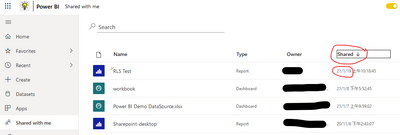
If you still want to make the end-user have both build permission to this dataset and RLS worked on him. I suggest you to go to open a support ticket and ask the technical support team for possiblity of solution of this problem.
https://powerbi.microsoft.com/en-us/support/
Best Regards,
Community Support Team _Robert Qin
If this post helps, then please consider Accept it as the solution to help the other members find it more quickly.


- Mark as New
- Bookmark
- Subscribe
- Mute
- Subscribe to RSS Feed
- Permalink
- Report Inappropriate Content
@Anonymous
Have you find the solution for your problem?
I am facing the same issue
- Mark as New
- Bookmark
- Subscribe
- Mute
- Subscribe to RSS Feed
- Permalink
- Report Inappropriate Content
Unfortunately not.

- Mark as New
- Bookmark
- Subscribe
- Mute
- Subscribe to RSS Feed
- Permalink
- Report Inappropriate Content
Facing the same problem here. 😞
- Mark as New
- Bookmark
- Subscribe
- Mute
- Subscribe to RSS Feed
- Permalink
- Report Inappropriate Content
Thank you @v-robertq-msft for your support and all proposed solutions. I will pass this issue to the technical support.
Best regards
- Mark as New
- Bookmark
- Subscribe
- Mute
- Subscribe to RSS Feed
- Permalink
- Report Inappropriate Content
Hi, @Anonymous
From my point of view, I still believe that the end-user can not both have build permission to this dataset and RLS worked on him. These two cases tell the similar thing about my opinion:
https://community.powerbi.com/t5/Service/Can-t-Get-RLS-to-Work/m-p/46964
But it’s very weird that the end-user can’t find the dataset when the report and build permission are shared to him. Because I can find the dataset and the report when I tested the sharing with build permission using the end-user account:
If you still want to make the end-user have both build permission to this dataset and RLS worked on him. I suggest you to go to open a support ticket and ask the technical support team for possiblity of solution of this problem.
https://powerbi.microsoft.com/en-us/support/
Best Regards,
Community Support Team _Robert Qin
If this post helps, then please consider Accept it as the solution to help the other members find it more quickly.
- Mark as New
- Bookmark
- Subscribe
- Mute
- Subscribe to RSS Feed
- Permalink
- Report Inappropriate Content
Thank you @v-robertq-msft but none of those solution works for us. User simply cannot see the dataset using any of above approaches both with or without Viewer access role. It is only accessible if user is an Member or Contributor, but then it disables the RLS.
- Mark as New
- Bookmark
- Subscribe
- Mute
- Subscribe to RSS Feed
- Permalink
- Report Inappropriate Content
Hi, @Anonymous
Has the end-user opened the link or email you shared with him?
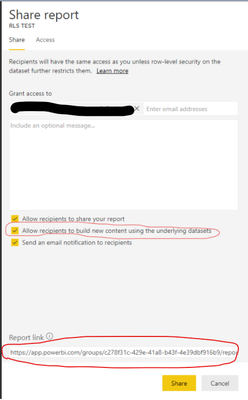
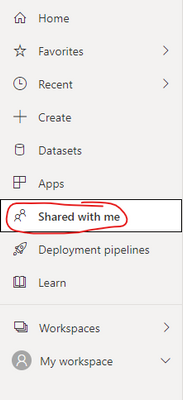
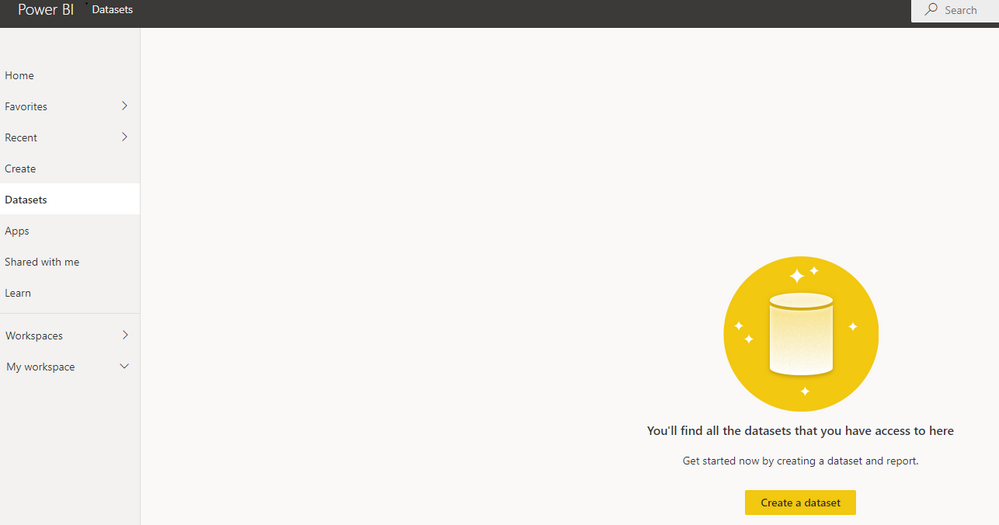
If the end-user can not see the dataset, you can also check if he can find the shared report in the “Shared with me”?
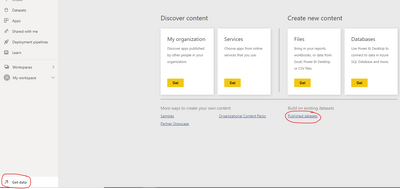
You can also go to the “Get data”->” Published dataset” to check if he can find the shared dataset.
One last thing, have you removed the end-user's “Viewer” access to your workspace? Because this “Viewer” access will keep him away from the dataset.
Best Regards,
Community Support Team _Robert Qin
If this post helps, then please consider Accept it as the solution to help the other members find it more quickly.
- Mark as New
- Bookmark
- Subscribe
- Mute
- Subscribe to RSS Feed
- Permalink
- Report Inappropriate Content

- Mark as New
- Bookmark
- Subscribe
- Mute
- Subscribe to RSS Feed
- Permalink
- Report Inappropriate Content
Hi, @Anonymous
I’ve read the document you posted. Here’s my understanding of the Build permission for shared datasets:
When you add the user to your dataset with build permission, then they can get access to the dataset and build reports. When you add the user to the workspace with Member or contributor, of course, they can access all the content in the workspace, including the dataset. However, when you add the user to the workspace with the Viewer role, then the user can not access any dataset within the workspace even if they have been given the build permission. Because the priority of the viewer role is higher than the build permission. This is also the original purpose of creating the role of the viewer. You can check this document:
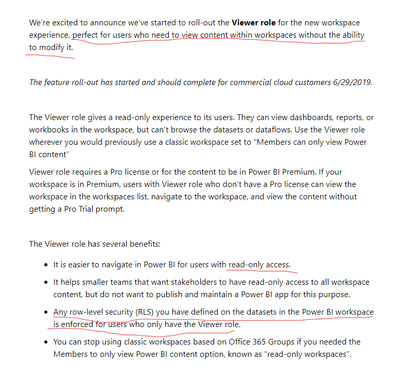
Document link:
https://powerbi.microsoft.com/en-us/blog/announcing-the-new-viewer-role-for-power-bi-workspaces/
My suggestion is to remove the user from the workspace and share the report to him with the build permission, like this:

And the end-user can find the dataset and create reports here:
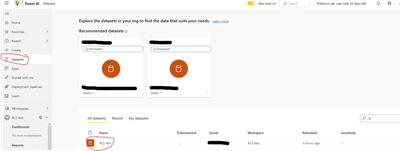
Best Regards,
Community Support Team _Robert Qin
If this post helps, then please consider Accept it as the solution to help the other members find it more quickly.
- Mark as New
- Bookmark
- Subscribe
- Mute
- Subscribe to RSS Feed
- Permalink
- Report Inappropriate Content
Hi, @Anonymous
According to your description, you said the users are able to display reports with correct permission according to RLS. One thing you should keep in mind: The RLS can only work for the users that have only view permission to the dataset. Therefore, I don’t think that the users have been given the build permission of the dataset.
What’s more, the viewer in the new workspace is not able to edit any content in the workspace. In my opinion, you have to choose one thing between RLS and build permission for the users. Once the RLS works on them, they won’t have the build permission. Once the build permission is given, they won’t be restricted with RLS.
I suggest you to promote the users to the “Member” of the workspace so that they can find the dataset and create reports in Power BI Service.
Roles in Power BI new workspace
More info about RLS in Power BI
Best Regards,
Community Support Team _Robert Qin
If this post helps, then please consider Accept it as the solution to help the other members find it more quickly.
- Mark as New
- Bookmark
- Subscribe
- Mute
- Subscribe to RSS Feed
- Permalink
- Report Inappropriate Content
Thank you Robert.
According to the document that you linked Roles in Power BI new workspace Build permission should give the user the right to create content over a shared dataset. If only Member or Contributor should have this possibility, why this option is grantable also to Viewers? Please see the quote below:
To copy a report, and to create a report in another workspace based on a dataset in this workspace, you need Build permission for the dataset. For datasets in this workspace, the people with Admin, Member, and Contributor roles automatically have Build permission through their workspace role.
Also, from what you said I understand that giving Build permission should revoke RLS for that user and give them possibility to build content - and suprisingly, for me it is working in the oppisite way. RLS is still in place, but there is still no way to access the dataset in order to create new report. In order check that, I disabled RLS and users (Viewers with Build permission) are still not able to create a report using the dataset. Maybe this is just an inconsistency between the documentation and how actually the Service works?
- Mark as New
- Bookmark
- Subscribe
- Mute
- Subscribe to RSS Feed
- Permalink
- Report Inappropriate Content
Hi, @Anonymous
I don’t think users’ access to the dataset is related to the existence of RLS. It’s only about permission given.
What’s more, RLS can always work on the viewers of the workspace in my opinion.
Would you like to try to change the users’ role to Member or contributor in the workspace and check if they can build reports using this dataset?
Best Regards,
Community Support Team _Robert Qin
If this post helps, then please consider Accept it as the solution to help the other members find it more quickly.
- Mark as New
- Bookmark
- Subscribe
- Mute
- Subscribe to RSS Feed
- Permalink
- Report Inappropriate Content
HI @v-robertq-msft,
Thanks for your response. I agree that RLS is not the case - that was my point, despite the RLS on/off Viewers with build can not create reports.
I have checked other access levels and this is how it looks:
- Member - can create a report / RLS does not apply
- Contributor - can create a report / RLS does not apply
- Viewer with Build - can not create a report / RLS applies
- Mark as New
- Bookmark
- Subscribe
- Mute
- Subscribe to RSS Feed
- Permalink
- Report Inappropriate Content
Hi, @Anonymous
The test result is the same as I expected.😁 Thank you for your understanding and detailed experiment for each role in the workspace, which can also help other community members a lot. Would you like to accept your own reply as a solution so that other community members can learn from this too?
Thank you very much!
How to Get Your Question Answered Quickly
Best Regards,
Community Support Team _Robert Qin
If this post helps, then please consider Accept it as the solution to help the other members find it more quickly.
- Mark as New
- Bookmark
- Subscribe
- Mute
- Subscribe to RSS Feed
- Permalink
- Report Inappropriate Content
Hello,
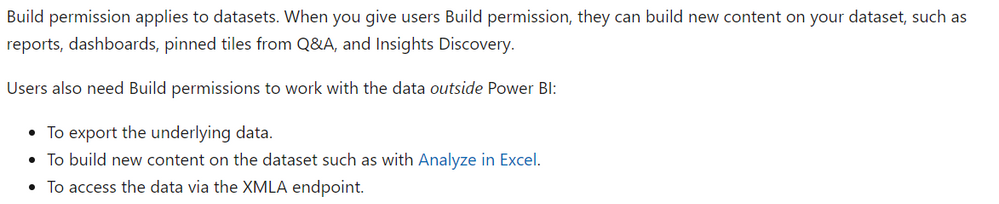
I still do not see any solution. From what I understand from Build permission for shared datasets document, Viewer with Build permission should be able to create reports - my post only proves that in my case it is not working that way. Either the documentation is misleading, or I am not getting it right. Could you please advise?


- Mark as New
- Bookmark
- Subscribe
- Mute
- Subscribe to RSS Feed
- Permalink
- Report Inappropriate Content
yes you have 2 way for this:
1) on the siervice you can go to get data and get company content datasets:

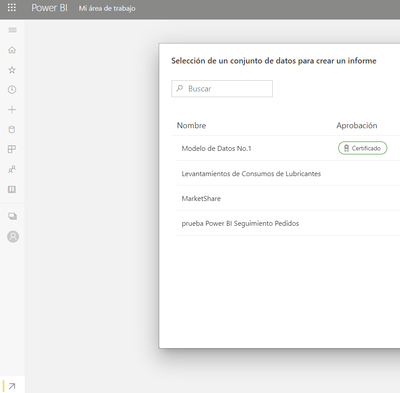
2) open a power bi desktop file and new source use a power bi dataset as source.
aslo read: https://docs.microsoft.com/en-us/power-bi/connect-data/service-datasets-across-workspaces
if this solved your question please mark as solution for others to find it more easily, and if you liked the solution give some kudos.
Did I answer your question? Mark my post as a solution! / Did it help? Give some Kudos!
Proud to be a Super User!
- Mark as New
- Bookmark
- Subscribe
- Mute
- Subscribe to RSS Feed
- Permalink
- Report Inappropriate Content
Thank you for your answer.
Unfortunately, data set is not visible in the list of published data sources.
Do you have any other ideas?
Helpful resources

Power BI Monthly Update - November 2025
Check out the November 2025 Power BI update to learn about new features.

Fabric Data Days
Advance your Data & AI career with 50 days of live learning, contests, hands-on challenges, study groups & certifications and more!

FabCon Atlanta 2026
Join us at FabCon Atlanta, March 16-20, for the ultimate Fabric, Power BI, AI and SQL community-led event. Save $200 with code FABCOMM.


