cancel
Showing results for 
Search instead for 
Did you mean: 

Learn from the best! Meet the four finalists headed to the FINALS of the Power BI Dataviz World Championships! Register now

Reply
samanthamirae
Resolver I
Resolver I

Automatic screenshots of dashboard save to SharePoint?

Hello,


Is there any way/ any program that is able to automatically take screenshots of my Power BI Dashboard (which will be open at all times) and save it to a SharePoint folder? For example, I'd like to schedule a program to take screenshots of my dashboard every week Monday and save it to Sharepoint. Thank you

1 ACCEPTED SOLUTION
v-frfei-msft
Community Support
Community Support

Hi @samanthamirae,


Based on my research, from Power BI side, there is no way to achieve the goal as you mentioned.


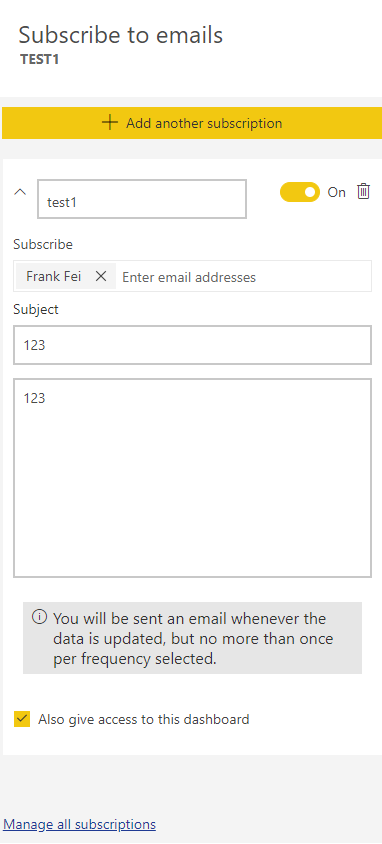
However, I suggest to use the Subscribe function here. You can find the icon on the upper right corner. Once the related datasets update, a notification will be sent to the end users. Also you can add a group into the Email address, then all the group members will receive the notification. For more details, please check the online document.


1.png


I refreshed the dataset, then I got the notification email as the picture as below very soon.


2.png


Regards,

Frank

Community Support Team _ Frank
If this post helps, then please consider Accept it as the solution to help the others find it more quickly.

View solution in original post

2 REPLIES 2
v-frfei-msft
Community Support
Community Support

Hi @samanthamirae,


Based on my research, from Power BI side, there is no way to achieve the goal as you mentioned.


However, I suggest to use the Subscribe function here. You can find the icon on the upper right corner. Once the related datasets update, a notification will be sent to the end users. Also you can add a group into the Email address, then all the group members will receive the notification. For more details, please check the online document.


1.png


I refreshed the dataset, then I got the notification email as the picture as below very soon.


2.png


Regards,

Frank

Community Support Team _ Frank
If this post helps, then please consider Accept it as the solution to help the others find it more quickly.

Hi @v-frfei-msft,


This is actually almost exactly what I was looking for. Thank you!

Helpful resources

Announcements
Join our Fabric User Panel

Join our Fabric User Panel

Share feedback directly with Fabric product managers, participate in targeted research studies and influence the Fabric roadmap.

February Power BI Update Carousel

Power BI Monthly Update - February 2026

Check out the February 2026 Power BI update to learn about new features.