cancel
Showing results for 
Search instead for 
Did you mean: 

The Power BI Data Visualization World Championships is back! Get ahead of the game and start preparing now! Learn more

Reply
Anonymous
Not applicable

how to upload the dashboard to the server when an error received

Hi all,


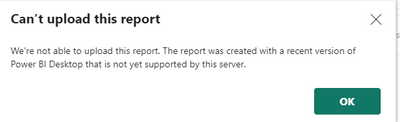
Could you please help me with how can I upload the dashboard to the server when I received an error about the version that was used? this version is newer than the server, but when I wanted to store it in the older version I was not able to sign in( this was the reason why I installed the newer version). I am using in this workflow interface with SharePoint and Teradata so I need to set up refresh as well. Could you please help me how can I resolve this case? 


Katarina4_0-1679474561605.png


Thank you 


Katarina

1 REPLY 1
d_gosbell
Super User
Super User

I've published a blog post covering this issue, why it occurs and some possible fixes
Power BI Report Server – fixing “Can’t upload this report” – Random Procrastination (gosbell.com)

Helpful resources

Announcements
November Power BI Update Carousel

Power BI Monthly Update - November 2025

Check out the November 2025 Power BI update to learn about new features.

Fabric Data Days Carousel

Fabric Data Days

Advance your Data & AI career with 50 days of live learning, contests, hands-on challenges, study groups & certifications and more!

FabCon Atlanta 2026 carousel

FabCon Atlanta 2026

Join us at FabCon Atlanta, March 16-20, for the ultimate Fabric, Power BI, AI and SQL community-led event. Save $200 with code FABCOMM.