cancel
Showing results for 
Search instead for 
Did you mean: 

The Power BI Data Visualization World Championships is back! Get ahead of the game and start preparing now! Learn more

Reply
Naverie
Helper I
Helper I

SQL Server

Hi,


We have a report we have created using sql server connections and then tables created on the fly in Power BI.


The business is now wanting to publish this report but aren't able to as the data needs to be converted to SQL.


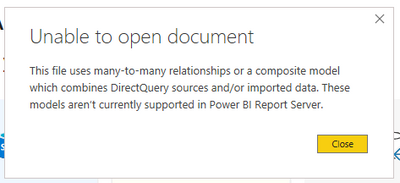
However, from what I can gather (and I am certainly no expert) as long as the data is coming via a direct query to connect to the tables then this should be able to be published. There are some tables that need to be looked at as the below error message shows when trying to load the report, but once these are sorted you should still be able to transform the data within Power BI?

Naverie_0-1619182659419.png


If someone could help that would be greatly appreicated as I don't want to have to create all these new tables in SQL if not needed.


TIA


1 ACCEPTED SOLUTION
luisrh
Responsive Resident
Responsive Resident

I would suggest that you choose one way.  In PBI RS you cannot mix Import and direct query data sources.   When you say on the Fly,  are these being created thru M functions or are they dependent on joins to directquery data sources?   If you are going to stage data this way,  it's probably best you do that on the SQL end or just use import.    Again, all that depends on your use case,  but what you are wanting to do is not doable in PBI RS.  

View solution in original post

1 REPLY 1
luisrh
Responsive Resident
Responsive Resident

I would suggest that you choose one way.  In PBI RS you cannot mix Import and direct query data sources.   When you say on the Fly,  are these being created thru M functions or are they dependent on joins to directquery data sources?   If you are going to stage data this way,  it's probably best you do that on the SQL end or just use import.    Again, all that depends on your use case,  but what you are wanting to do is not doable in PBI RS.  

Helpful resources

Announcements
Power BI DataViz World Championships

Power BI Dataviz World Championships

The Power BI Data Visualization World Championships is back! Get ahead of the game and start preparing now!

November Power BI Update Carousel

Power BI Monthly Update - November 2025

Check out the November 2025 Power BI update to learn about new features.

FabCon Atlanta 2026 carousel

FabCon Atlanta 2026

Join us at FabCon Atlanta, March 16-20, for the ultimate Fabric, Power BI, AI and SQL community-led event. Save $200 with code FABCOMM.