This time we’re going bigger than ever. Fabric, Power BI, SQL, AI and more. We're covering it all. You won't want to miss it.
Learn moreLevel up your Power BI skills this month - build one visual each week and tell better stories with data! Get started
Hi everybody,
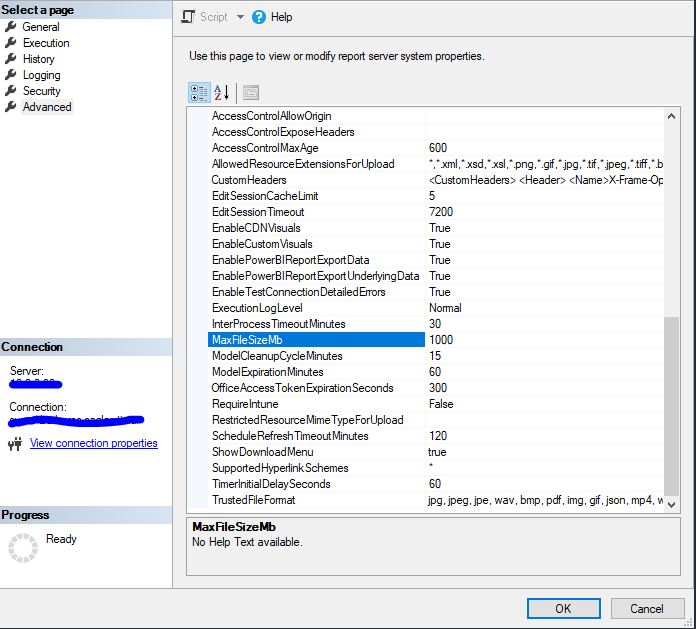
I have a problem with some datasets that need to be available in reporting server. Unfortunately we passed the limit of 1GB.
From the change logs i can see that there is an option to change the dataset size from default 1GB to 2 GB but i cannot find in the config.
Have someone did it and can pass me a screen where the option is ?
Thanks in advance!
Do you mean max file size? If so from Server Properties -> Advanced
@saglamtimur Thanks for help, i chacked on 2 instances but i have completely different GUI and no field like that.
The Tree is the same but has a lot more options in my case. 😞
We have raw PowerBI RS not SSMS . i looked in config.web aswell but there are no options like that.
So i'm stuck with 1 gb max filesize.
Power BI Report Server creates a database and "Server Type" which you can connect with SSMS. Where are you looking for this configuration? You must connect to "Reporting Services" "Server Type" with SSMS even it's Power BI Report Server. It's 99.99% percent same. Here is a short video, I have recored for you to show how to do this. Hope it helps.
If my post solved your problem, mark my post as a solution to help others to quickly find it and also please give it a 👍
Check out the April 2026 Power BI update to learn about new features.
Sign up to receive a private message when registration opens and key events begin.
If you have recently started exploring Fabric, we'd love to hear how it's going. Your feedback can help with product improvements.
| User | Count |
|---|---|
| 3 | |
| 2 | |
| 2 | |
| 1 | |
| 1 |
| User | Count |
|---|---|
| 2 | |
| 2 | |
| 2 | |
| 2 | |
| 2 |