
cancel
Showing results for 
Search instead for 
Did you mean: 

Next up in the FabCon + SQLCon recap series: The roadmap for Microsoft SQL and Maximizing Developer experiences in Fabric. All sessions are available on-demand after the live show. Register now

Reply
vijay22kar
Helper II
Helper II

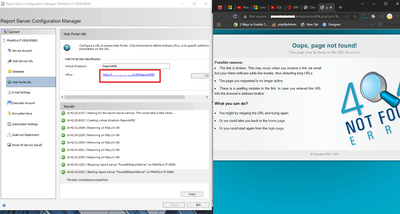
Report Server configuration error

vijay22kar_0-1644319206899.png

Hi All,

I have an error at the time of configuration of the report server. Please check the screenshot and advise.

1 ACCEPTED SOLUTION
v-henryk-mstf
Community Support
Community Support

Hi @vijay22kar ,


This can happen for one of two reasons. The domain you are trying to access is down, or your local cache is returning to an older IP address and the site you are trying to access has a new IP address.
The easiest way to verify that this is working is to try clearing your browser cache, or switching to another browser to log in.

vhenrykmstf_0-1644548229278.png


Other ways to do this are to try setting up inbound traffic rules and redeploying VMs or updating DNS, etc. Refer to the following documentation for information.

How to fix the issue: This site can't be reached. Server IP address could not be found. (nerdschalk....

Cannot access PowerBI Report Server with DNS - This site can't be reached (microsoft.com)


If the problem is still not resolved, please point it out and provide related operation screenshoots. Looking forward to your feedback.


Best Regards,
Henry


If this post helps, then please consider Accept it as the solution to help the other members find it more quickly.

View solution in original post

4 REPLIES 4
v-henryk-mstf
Community Support
Community Support

Hi @vijay22kar ,


This can happen for one of two reasons. The domain you are trying to access is down, or your local cache is returning to an older IP address and the site you are trying to access has a new IP address.
The easiest way to verify that this is working is to try clearing your browser cache, or switching to another browser to log in.

vhenrykmstf_0-1644548229278.png


Other ways to do this are to try setting up inbound traffic rules and redeploying VMs or updating DNS, etc. Refer to the following documentation for information.

How to fix the issue: This site can't be reached. Server IP address could not be found. (nerdschalk....

Cannot access PowerBI Report Server with DNS - This site can't be reached (microsoft.com)


If the problem is still not resolved, please point it out and provide related operation screenshoots. Looking forward to your feedback.


Best Regards,
Henry


If this post helps, then please consider Accept it as the solution to help the other members find it more quickly.

josef78
Memorable Member
Memorable Member

First, check id any software is not running and listening on your port 80, or use another port

Second, check if configuration (URL, ports, certificates) are same for Web Service URL and Web Portal URL

vijay22kar
Helper II
Helper II

Thanks, @d_gosbell 

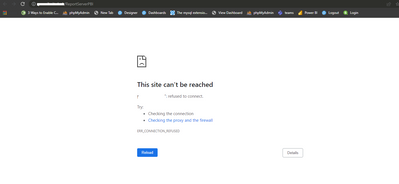
Checked the other software, now the below error is shown. pls, guide.

vijay22kar_1-1644381732460.png


d_gosbell
Super User
Super User

The error page you are showing is not a Power BI Report Server error. That error404.php page is coming from some other software on that machine. Report Server does not use php for any of it's pages. You'll need to figure out what this other software is and either switch it off or change it's configuration to stop it trying to serve the report server address.

Helpful resources

Announcements
New to Fabric survey Carousel

New to Fabric Survey

If you have recently started exploring Fabric, we'd love to hear how it's going. Your feedback can help with product improvements.

Power BI DataViz World Championships carousel

Power BI DataViz World Championships - June 2026

A new Power BI DataViz World Championship is coming this June! Don't miss out on submitting your entry.

Join our Fabric User Panel

Join our Fabric User Panel

Share feedback directly with Fabric product managers, participate in targeted research studies and influence the Fabric roadmap.

March Power BI Update Carousel

Power BI Community Update - March 2026

Check out the March 2026 Power BI update to learn about new features.