Join us at FabCon Atlanta from March 16 - 20, 2026, for the ultimate Fabric, Power BI, AI and SQL community-led event. Save $200 with code FABCOMM.
Register now!Learn from the best! Meet the four finalists headed to the FINALS of the Power BI Dataviz World Championships! Register now
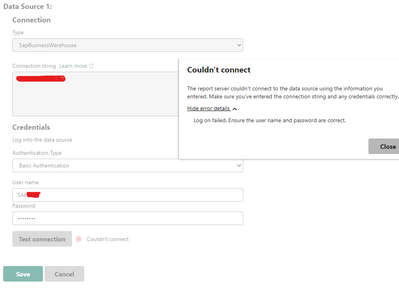
Hey! I have built a PBI report in Desktop app which used SAP BW as a data source, everything was ok, data was imported successfully and uploaded it to on-premise PBI report server. I needed to configure scheduled refresh, so I installed the SAP .NET connector on the server, typed the username and password in a report's data source window in a browser. When I test the connection it throws "Log on failed. Ensure the user name and password are correct." error. SAP audit doesn't catch any failed logins.
In other words, SAP BW credentials work in PBI Desktop but not in PBI Report Server.
Can you help with the problem?
Hi everybody! It seems like everything have already worked fine. The problems was due to Test Connection function, which doesn't worked with SAP BW.
Share feedback directly with Fabric product managers, participate in targeted research studies and influence the Fabric roadmap.
Check out the February 2026 Power BI update to learn about new features.
| User | Count |
|---|---|
| 3 | |
| 3 | |
| 1 | |
| 1 | |
| 1 |
| User | Count |
|---|---|
| 6 | |
| 5 | |
| 4 | |
| 3 | |
| 3 |