cancel
Showing results for 
Search instead for 
Did you mean: 

The Power BI Data Visualization World Championships is back! Get ahead of the game and start preparing now! Learn more

Reply
Rocky_Brown
Helper I
Helper I

Printer settings

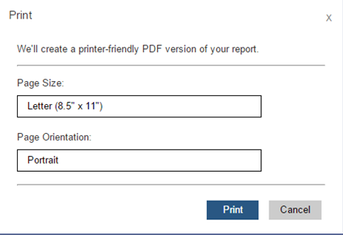
Can a report's print settings be set at a global level?  Looking to set a report to print landscape when a user opens the report to print.  My browser is set that wasy, but I am not sure if i can set the report globally to print that way?

1 ACCEPTED SOLUTION
v-henryk-mstf
Community Support
Community Support

Hi @Rocky_Brown ,


The browser is the most common client application used to view reports, but the browser print function is not suitable for printing reports. Pages printed from the browser include all visual elements on the page, as well as header and footer information identifying the page or site, and for multi-page reports, the browser prints up to the first page, which may be less if the report page exceeds the size of the printed page.


Report server administrators have the option of disabling the remote print feature by setting the report server system property EnableClientPrinting to false. This setting is for client printing of all reports. It can be set in the following two ways:

   1.For a Native mode report server.
   2.For a SharePoint mode report server.
vhenrykmstf_0-1630289433478.png


If the problem is still not resolved, please provide detailed error information and let me know immediately. Looking forward to your reply.


Best Regards,
Henry


If this post helps, then please consider Accept it as the solution to help the other members find it more quickly.

View solution in original post

1 REPLY 1
v-henryk-mstf
Community Support
Community Support

Hi @Rocky_Brown ,


The browser is the most common client application used to view reports, but the browser print function is not suitable for printing reports. Pages printed from the browser include all visual elements on the page, as well as header and footer information identifying the page or site, and for multi-page reports, the browser prints up to the first page, which may be less if the report page exceeds the size of the printed page.


Report server administrators have the option of disabling the remote print feature by setting the report server system property EnableClientPrinting to false. This setting is for client printing of all reports. It can be set in the following two ways:

   1.For a Native mode report server.
   2.For a SharePoint mode report server.

vhenrykmstf_0-1630289433478.png


If the problem is still not resolved, please provide detailed error information and let me know immediately. Looking forward to your reply.


Best Regards,
Henry


If this post helps, then please consider Accept it as the solution to help the other members find it more quickly.

Helpful resources

Announcements
Power BI DataViz World Championships

Power BI Dataviz World Championships

The Power BI Data Visualization World Championships is back! Get ahead of the game and start preparing now!

December 2025 Power BI Update Carousel

Power BI Monthly Update - December 2025

Check out the December 2025 Power BI Holiday Recap!

FabCon Atlanta 2026 carousel

FabCon Atlanta 2026

Join us at FabCon Atlanta, March 16-20, for the ultimate Fabric, Power BI, AI and SQL community-led event. Save $200 with code FABCOMM.